Introduction
The issues described in this document were first reported to Microsoft in December 2024. At that time, not all the evidence now available had been collected, yet the gravity of the situation was already clear: an attacker could impersonate both internal and external users, deliver potentially malicious content, and automatically insert events into calendars without user interaction.
Despite this, Microsoft classified the behavior as “by design,” a conclusion we strongly disagreed with.
The report was resubmitted in October 2025 with additional technical details, extensive evidence, and a fully validated attack chain. In November 2025, after a further internal review, Microsoft acknowledged the spoofing vulnerability but again assessed it as moderate and stated that it did not require immediate attention.
This position overlooks the real-world impact these vulnerabilities have on user trust. While none of the issues directly compromise Microsoft’s infrastructure, they systematically undermine the trust model that users rely on every day: the authenticity of contacts, the integrity of the interface, and the assumption that what is shown on the screen reflects reality.
These vulnerabilities make it possible to:
- alter the behavior of trusted application interfaces, including the “Join meeting” actions presented in Outlook and Teams;
- manipulate link labels, replacing the true URL — normally exposed by the UI — with arbitrary attacker-controlled text;
- present both emails and calendar events as originating from legitimate internal contacts, complete with internal profile pictures and identity elements;
- hide the “on behalf of” header and mask the fact that the sender is external;
- remove any trace of the original (external) sender once the event lands in the calendar, making the attacker effectively invisible.
Individually, these behaviors might appear minor. Together, they create a powerful and highly effective trust-erosion vector. An attacker can construct an entirely fabricated reality for the user — trusted sender, trusted interface, trusted labels — while remaining completely undetected in the calendar context.
This raises a broader concern: Microsoft appears markedly more focused on vulnerabilities that pose a direct risk to its own systems than on those that erode the trust of the people using them. The human factor — the most exploited link in modern attacks — seems to receive less attention when the underlying issue does not threaten Microsoft’s infrastructure but instead destabilizes the user’s perception of safety.
Shifting all the risk onto the user while treating trust-breaking vulnerabilities as “moderate” is not aligned with the realities of contemporary threat vectors. In an ecosystem where social engineering is often the primary entry point, minimizing vulnerabilities that directly target user trust leaves individuals and organizations exposed.
Given Microsoft’s ongoing stance since December 2024, and in the interest of transparency and user protection, we have decided to publish this full report and make the findings openly accessible.
After the latest interactions that took place between November 18 and 19, Microsoft stated that they are willing to fix only two of the reported issues: the manipulation of link labels and the ability to hide the “on behalf of” header through underscore concatenations. However, they have explicitly indicated that they do not intend to address the remaining—and more critical—issues. According to their assessment, both the poisoning of the “Join meeting” button within the application interface and the full impersonation of an internal contact are considered “moderate” and not important enough to warrant remediation.
Since this situation has persisted since December 2024 without Microsoft acknowledging the associated risks, and after multiple unproductive interactions, we believe that the only ethically responsible course of action is to publish the full set of findings in the interest of user protection and transparency.
In later communications, Microsoft formally stated that public disclosure is permitted. However, this was not accompanied by any concrete evaluation of remediation strategy or by a defined timeline. The company reiterated its “moderate” severity assessment and confirmed only partial mitigations, without addressing the broader impact of the vulnerabilities or the urgency of resolving them.
This pattern has remained unchanged since December 2024: the ability to manipulate trusted interface elements and impersonate internal contacts has not been treated as a priority. Instead, these behaviors are implicitly framed as acceptable, provided they do not threaten Microsoft’s infrastructure and can be mitigated quietly on the server side. Such a view disregards the period in which the vulnerabilities were fully exploitable and normalizes the erosion of user trust as an acceptable trade-off.
Microsoft has also stated that no CVE should be issued because customers are not required to take action to receive mitigations. This reasoning overlooks the nature of the vulnerabilities themselves. The fact that remediation can be applied invisibly does not remove their existence or their real-world impact, nor does it erase the time during which they were exploitable. Treating them as non-CVE creates the perception that the issue can be quietly dismissed, discouraging responsible disclosure and undermining the relationship between researchers and platform owners.
Particularly concerning is the implication that a vulnerability affecting user trust is less relevant than one affecting infrastructure. Users are expected to rely on interface cues, identity indicators, and system behaviors that can be manipulated silently and without warning. A vulnerability that compromises trust remains a vulnerability, regardless of whether its fix is visible to the end user.
In light of these developments, and after nearly a year of communication in which the full attack chain has consistently been downplayed, the publication of this report is not merely justified — it is necessary. Security is not limited to infrastructure integrity: it includes protecting users from deception, misrepresentation, and interface abuse. When the trust model of a communication ecosystem can be compromised from the outside, transparency becomes the only responsible path forward.
The issues described affect the following products:Identified issues
- Outlook Web — Calendar and email
- (New) Outlook Desktop — Calendar and email
- Microsoft Teams Web — Calendar and interface
- Microsoft Teams Desktop — Calendar and interface
- Sender handling (Exchange)
These issues can be triggered through a standard email sent from any third-party service (e.g., Gmail) to recipients using an organizational Microsoft 365 domain or a personal Outlook.com account. The attack does not require access to the victim’s infrastructure — only the ability to send an email.
The attack is built from two fundamental elements:
- An altered ICS file embedded in the email — able to modify the behavior of standard interface buttons (e.g., Outlook/Teams “Join”) and redirect them to attacker-controlled sites.
- A manipulated From header encoded in UTF-8 — display name padded/encoded to hide the real sender and any “on behalf of” indicator.
- The ability to alter visible link titles in the email body or calendar event while the underlying href points to an attacker-controlled destination.
Once the email containing the embedded ICS is delivered, the platform follows the standard “on behalf of” logic: the message and the associated event are presented using the contact data of the purported sender. While this behaviour is expected, the user interface exhibits several critical weaknesses:
-
In the inbox list, the message displays the altered sender name.
The displayed sender name is constructed from the manipulated
Fromheader (UTF-8/Unicode tricks). This causes recipients to see a trusted or familiar name in the message list, increasing the chance the message and attached invitation will be opened. -
In the inbox list, the message displays the profile picture associated with the forged sender.
The UI surfaces the profile image of the impersonated contact alongside the forged display name. Together these visual cues create a strong impression of authenticity and reduce user suspicion.
-
The malicious event (including the ICS description) is automatically inserted into Outlook and Teams calendars.
Invitations delivered by email are added to the recipient’s calendar (Outlook Web/Desktop and Teams) under the impersonated contact. The HTML description carried in the ICS is rendered as the event body, so the content shown in the calendar/event view is the attacker-supplied description rather than the original email body. This visibility in the calendar makes users more likely to interact with the event.
-
Teams “Join” button behavior can be altered to point to attacker-controlled URLs.
Proprietary ICS properties (for example
X-MICROSOFT-SKYPETEAMSMEETINGURLor similarX-*fields) can be used to inject a custom URL that the client maps to the event’s “Join/Partecipa” control. As a result, the Join button may redirect users to external, potentially fraudulent sites under the attacker’s control.
In addition, the HTML content provided in the ICS (for example via X-ALT-DESC;FMTTYPE=text/html or DESCRIPTION) is rendered as the message/event body in the UI. This means the original
email body (which may be empty or contain benign text) can be effectively replaced by the ICS description displayed to the user. By injecting HTML and links through the ICS, an attacker can present clickable
content that may bypass conventional anti-spam/URL sanitization applied to ordinary message bodies.
Finally, invitations delivered by email are automatically inserted into the recipient’s calendar under the impersonated contact’s identity. This automatic, transparent insertion increases the likelihood that users will eventually interact with the event (open it, read it, or click participation links). Crucially, the insertion occurs without an effective verification step to confirm the true origin of the invitation, making this vector particularly dangerous for large-scale social engineering campaigns.
Mail body & Teams Join injection via ICS attributes
- The text contained in the ICS field X-ALT-DESC;FMTTYPE=text/html or DESCRIPTION is injected directly into the email body, completely hiding the original body. This allows bypassing antispam filters, which typically analyze only the email body and not the ICS attachment.
- By intentionally inserting the ICS field X-MICROSOFT-SKYPETEAMSMEETINGURL, it is possible to alter the behavior of the Outlook and Teams interface for the “Join Meeting” button, redirecting the user to URLs controlled by the attacker.
The event constructed in this way does not merely appear as a fraudulent email: it is displayed directly in the Outlook calendar UI as an appointment to be managed which, even if still “to be accepted”, does not reduce its danger and, more importantly, appears to have been sent by the manipulated contact, including the associated profile picture, completely losing the “on behalf of” reference.
Crucially, the HTML content and links supplied via X-ALT-DESC / DESCRIPTION are injected into the message/event UI and thus can be presented to the user without passing through the usual sanitization or rewriting that many anti-spam/anti-phishing systems apply to the message body. In practice, this means attacker-controlled links can appear and be clickable in the rendered event while bypassing common sanitizers that would otherwise neutralize or rewrite suspicious URLs.
In this scenario, the “on behalf of” label is effectively lost and does not appear to the user. The presence of the event in the calendar, apparently legitimate and visually coherent, creates a strong level of trust that can induce the user to interact with the invitation:
Teams interface alteration
- opening the message,
- reading the text,
- clicking the participation button.
The ability to modify Teams interface behavior further exacerbates the problem: the user, trusting the platform and its familiar graphical elements, clicks confidently on the interface buttons, convinced they are joining a legitimate meeting.
Link label title alteration
An easy and stealthy way to tamper link presentation is to nest an element carrying its own title attribute inside the anchor — for example an inner … — so that the visible tooltip/text shown to the user differs from the actual href.
The result: familiar Outlook/Teams buttons and link tooltips remain trustworthy to the user, while the actual destination is attacker-controlled — a UI trust failure that is hard to fully mitigate without strict client-side validation and consistent rendering rules across mail and calendar clients.
From formatting via UTF-8
By manipulating the email From field using UTF-8 encoding, it is also possible to:
- hide or remove forwarding visual indicators (e.g., “per conto di”/“on behalf of”)
- make the message even more credible to the recipient,
- use special UTF-8 characters to obfuscate the sender's real identity.
This technique acts directly on the elements that convey trust and legitimacy in the user interface.
Summary of issues
- Display of the forged name and profile picture in the inbox list, which amplifies user trust.
- Display of the event in the calendar as if it originated from a trusted contact, with a strong impact on perceived legitimacy. The “on behalf of” label is lost in the calendar interface, further increasing perceived credibility.
- Manipulation of the From field via UTF-8 encoding and formatting intended to obscure the sender's real identity.
- Injection of HTML body via ICS (X-ALT-DESC / DESCRIPTION) with the possibility of bypassing antispam filters by inserting malicious links; importantly, links injected this way can be rendered/clickable in the event UI while bypassing the usual sanitizers or URL-rewriting that anti-spam systems apply to ordinary message bodies.
- Alteration of the “Join Meeting” button behavior via X-MICROSOFT-SKYPETEAMSMEETINGURL, allowing controlled redirects.
Technical presentation
In light of the above, we now propose a walkthrough with technical evidence, screenshots and code used
The lab domain used for the potential victim is “securityassessment.it” and the emails involved are:
First scenario - forged internal sender:
- Forged internal sender: [email protected]
- Internal victim: [email protected]
- Attacker's external email: [email protected]
The first attack scenario consists of sending the victim ([email protected]) an e-mail invitation that appears to originate from the internal account [email protected], while being delivered via Gmail's SMTP server — therefore entirely external to the M365 environment.
From the following screenshots the points described above can be readily observed and will be commented one by one:
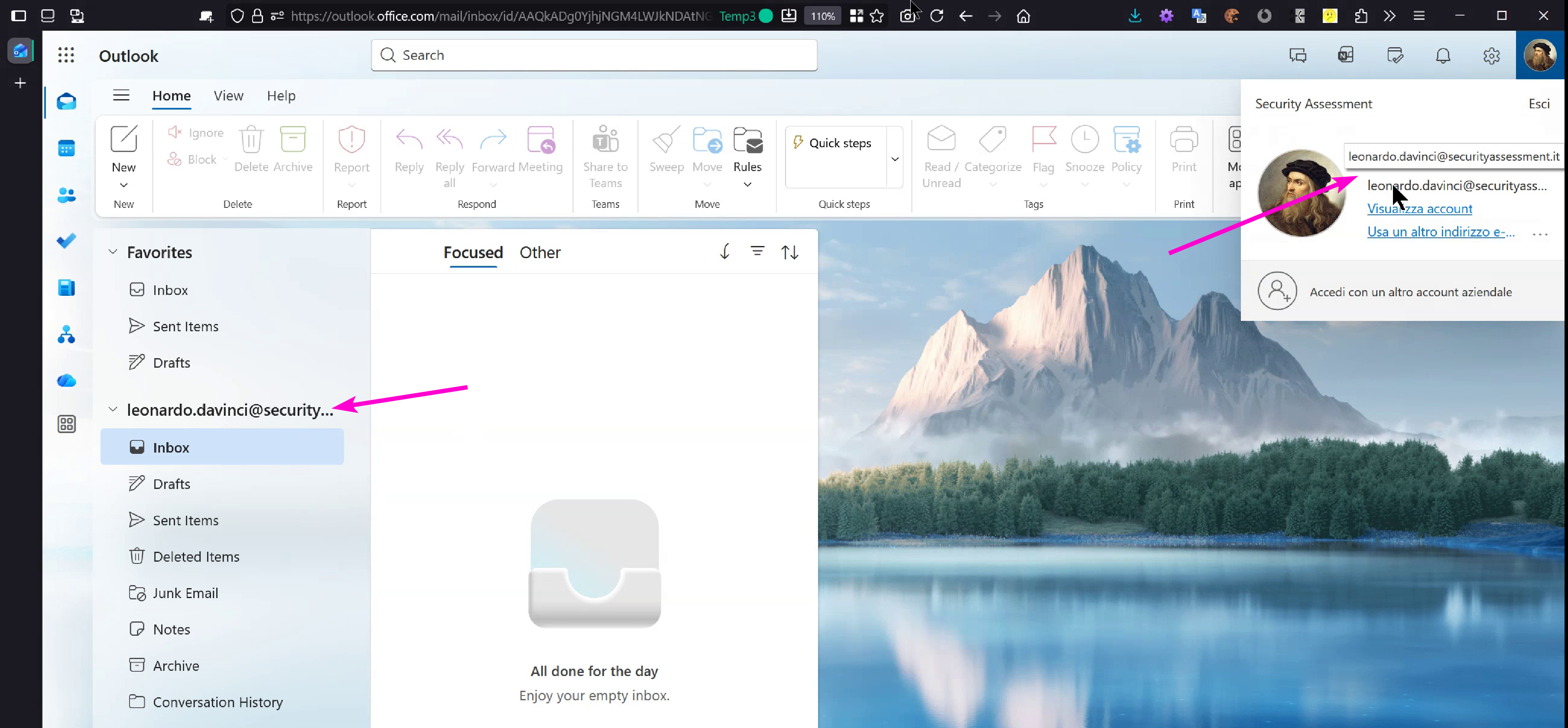
In this first screenshot we can see that we are inside the profile of the victim we are impersonating for
this demo, namely “Leonardo Da Vinci”:
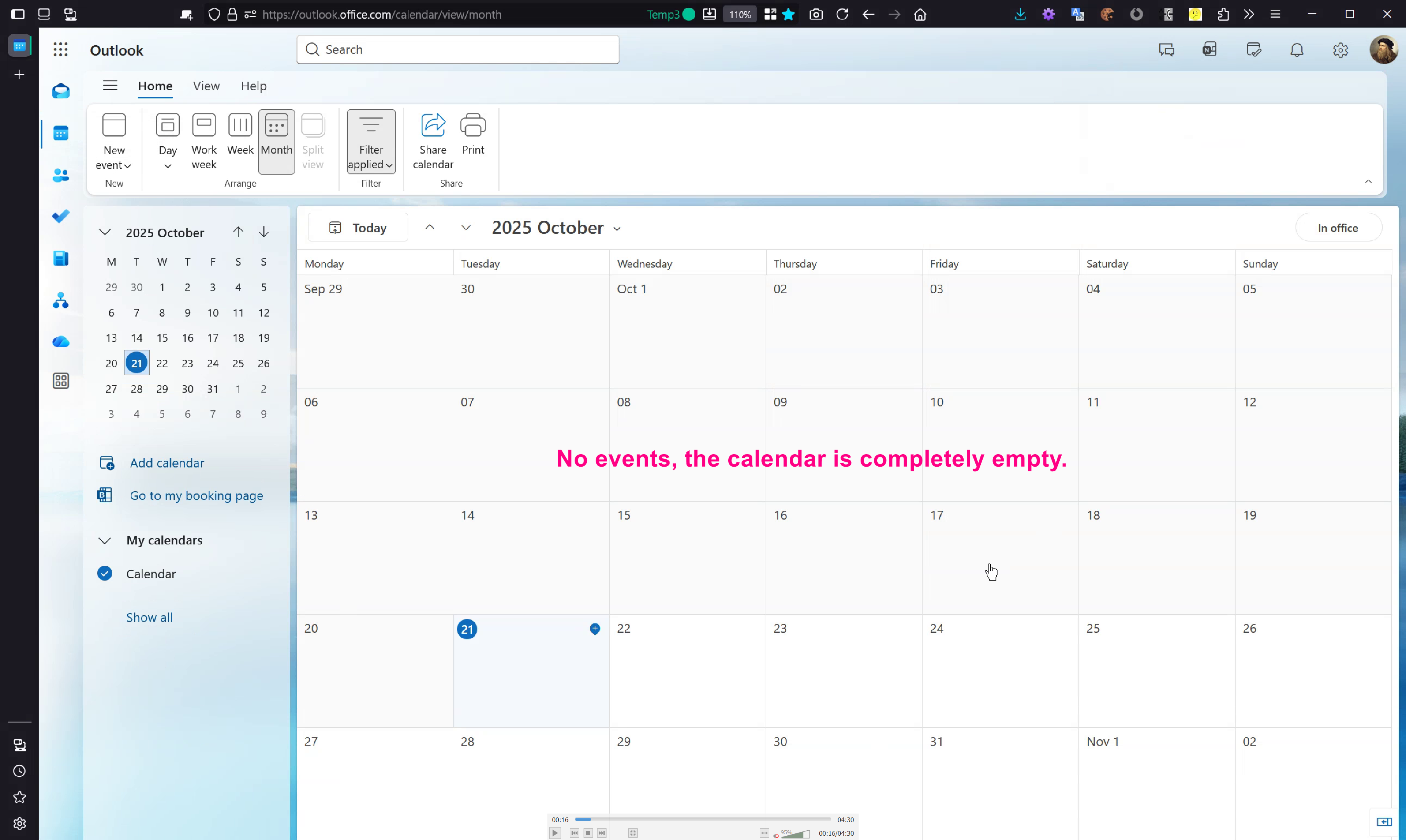
Looking at the victim user's calendar we note that it is completely clean:
We now simulate the attacker, who uses a simple Python script to forge the message and inject a crafted
iCal payload:
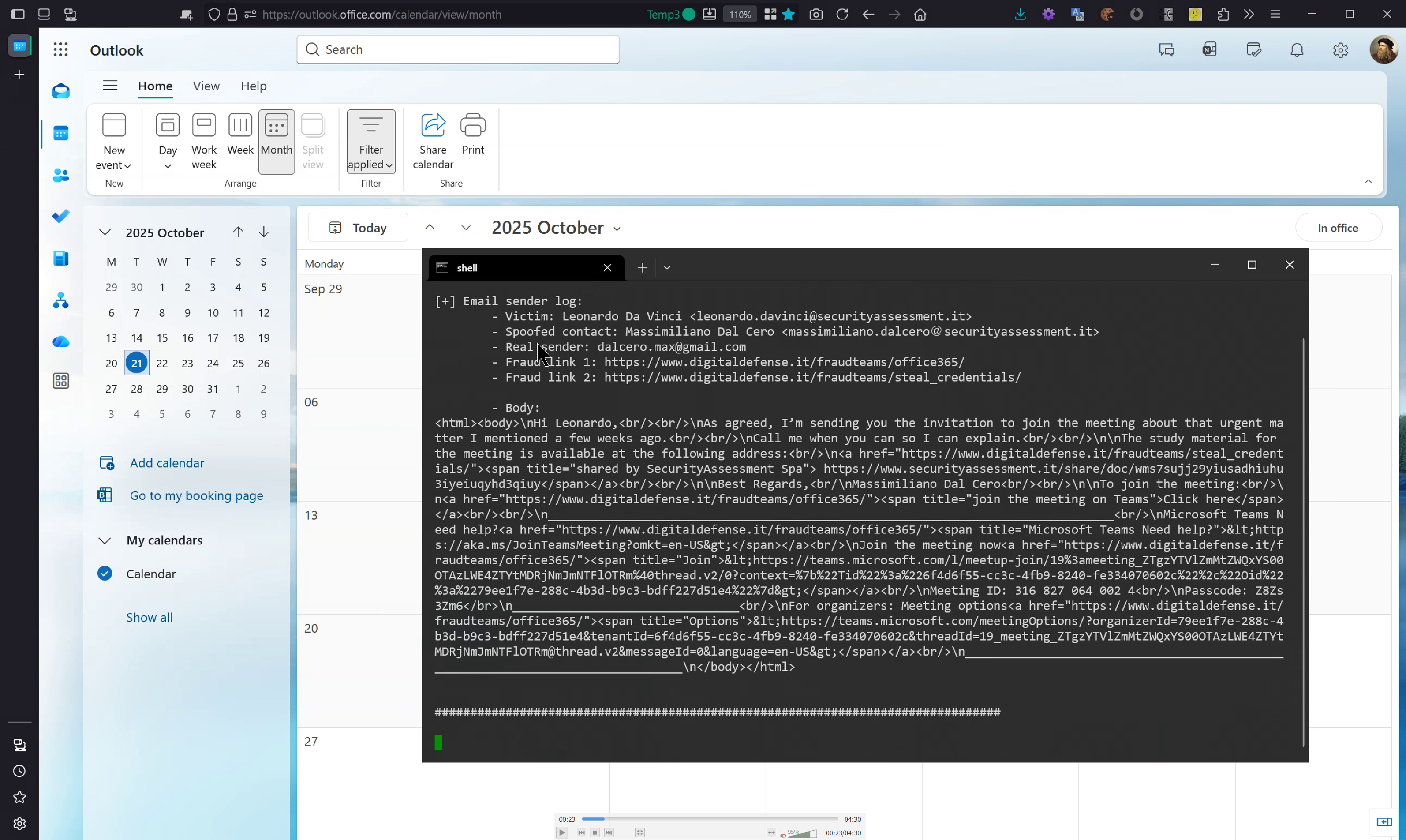
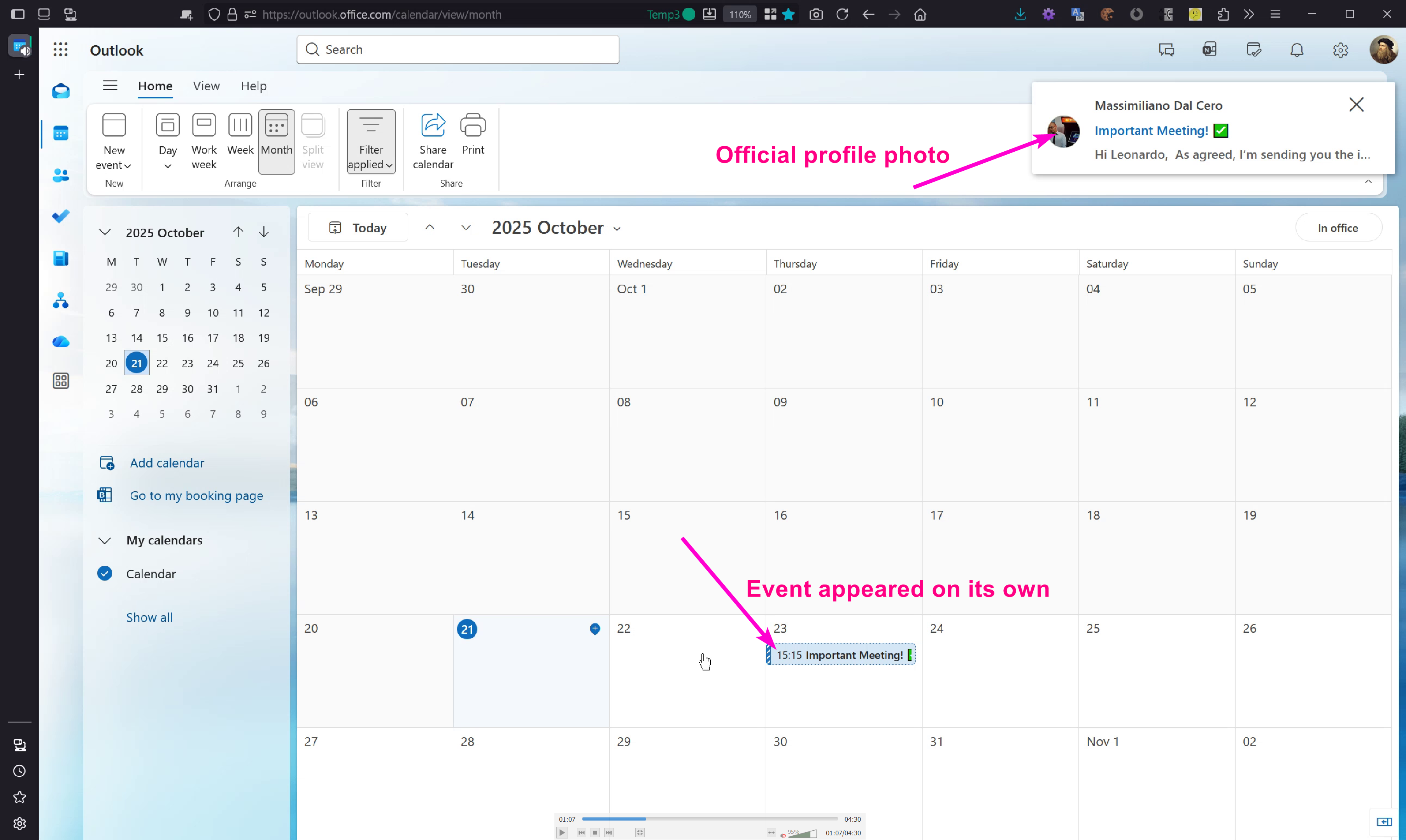
After running the script and waiting for mail delivery, the event appears automatically in the calendar and
the notification shows the sender as coming from our internal user, complete with the official profile photo
supplied by Office 365 itself:
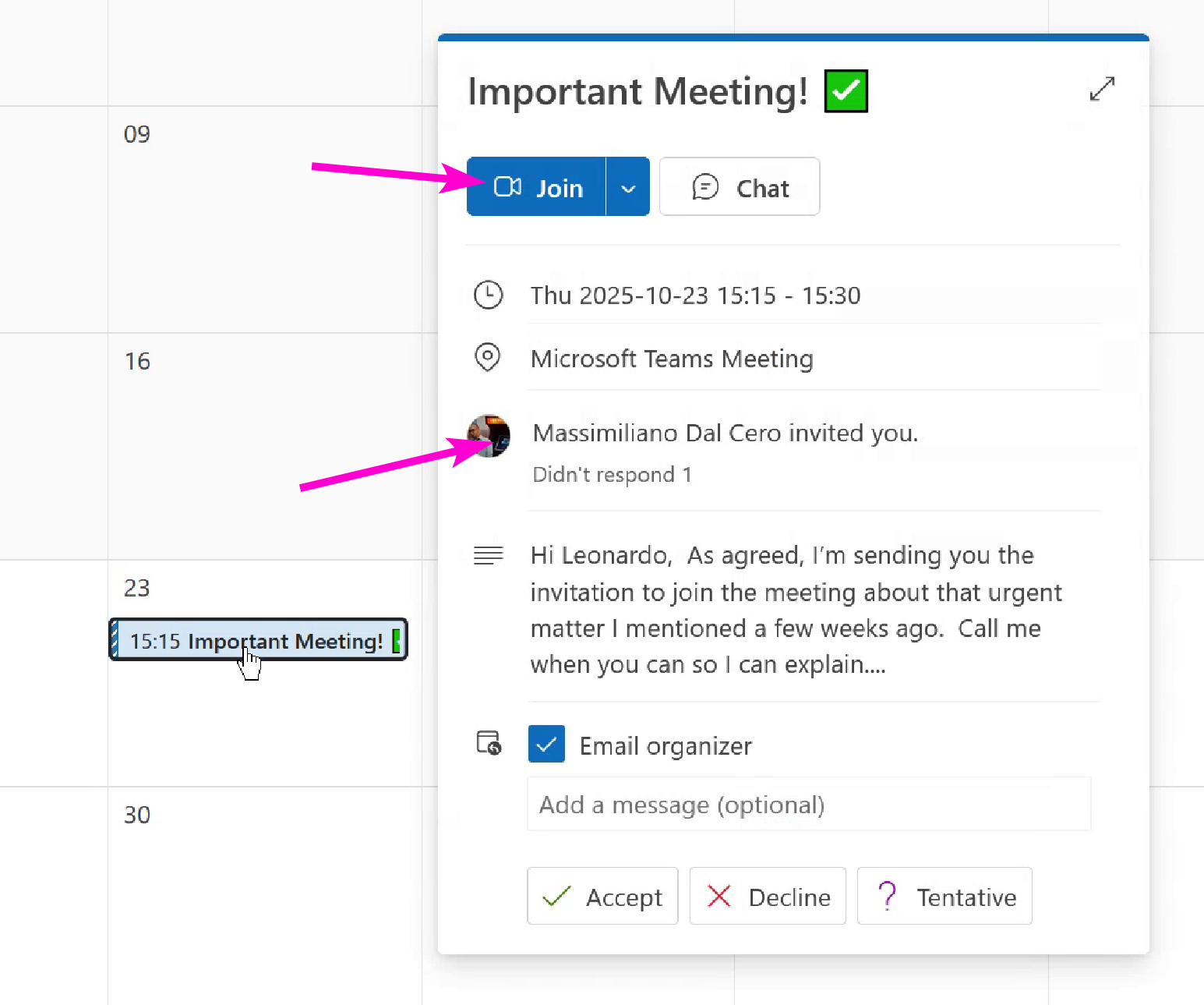
Inspecting the calendar detail by hovering the cursor over the event reveals that it is presented as an
official event from “Massimiliano Dal Cero”:
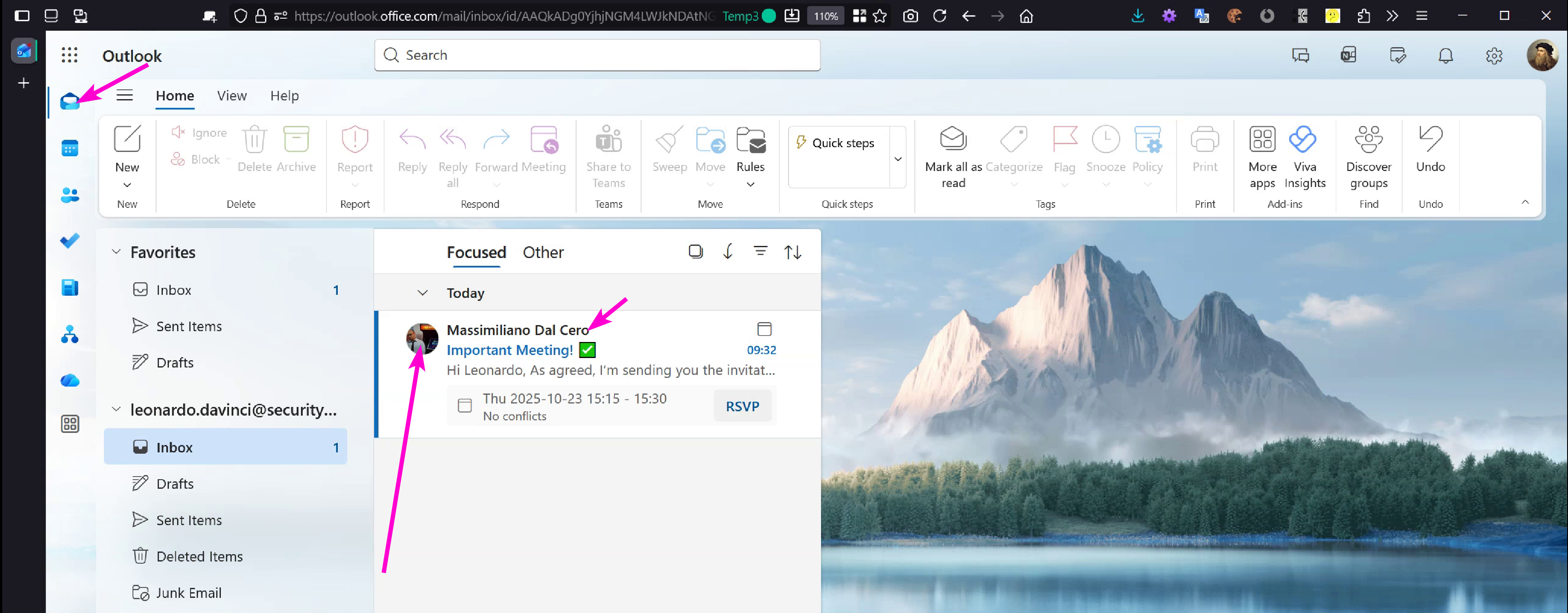
The same effect is visible in the Sent mail section: the message appears to come from an internal contact that
the victim considers trusted.
Opening the message displays the same indicators that would lead a user to believe they are viewing an
official e-mail. As visible in the screenshot, the attacker’s e-mail address is not shown visually in the
sender field and there is no “behalf of” marker — the attacker has pushed that detail out of the visible area,
making the message even more convincing.
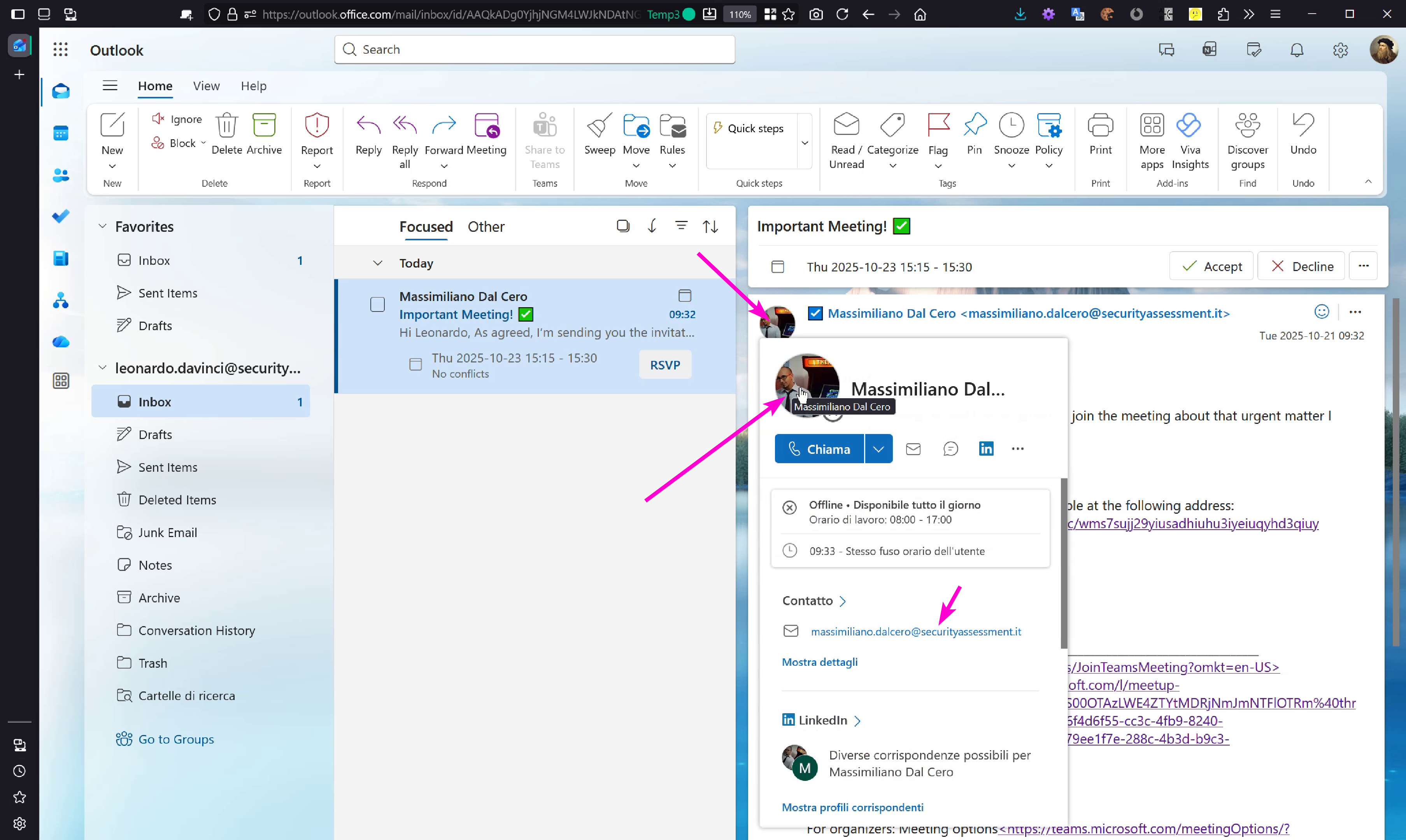
Analysing the e-mail body we observe that links have been manipulated to appear different from their real
destinations; the link text (the title) is attacker-controlled and, on desktop, the real target is normally
visible in the lower left corner of the application — however that area is not always present on every client.
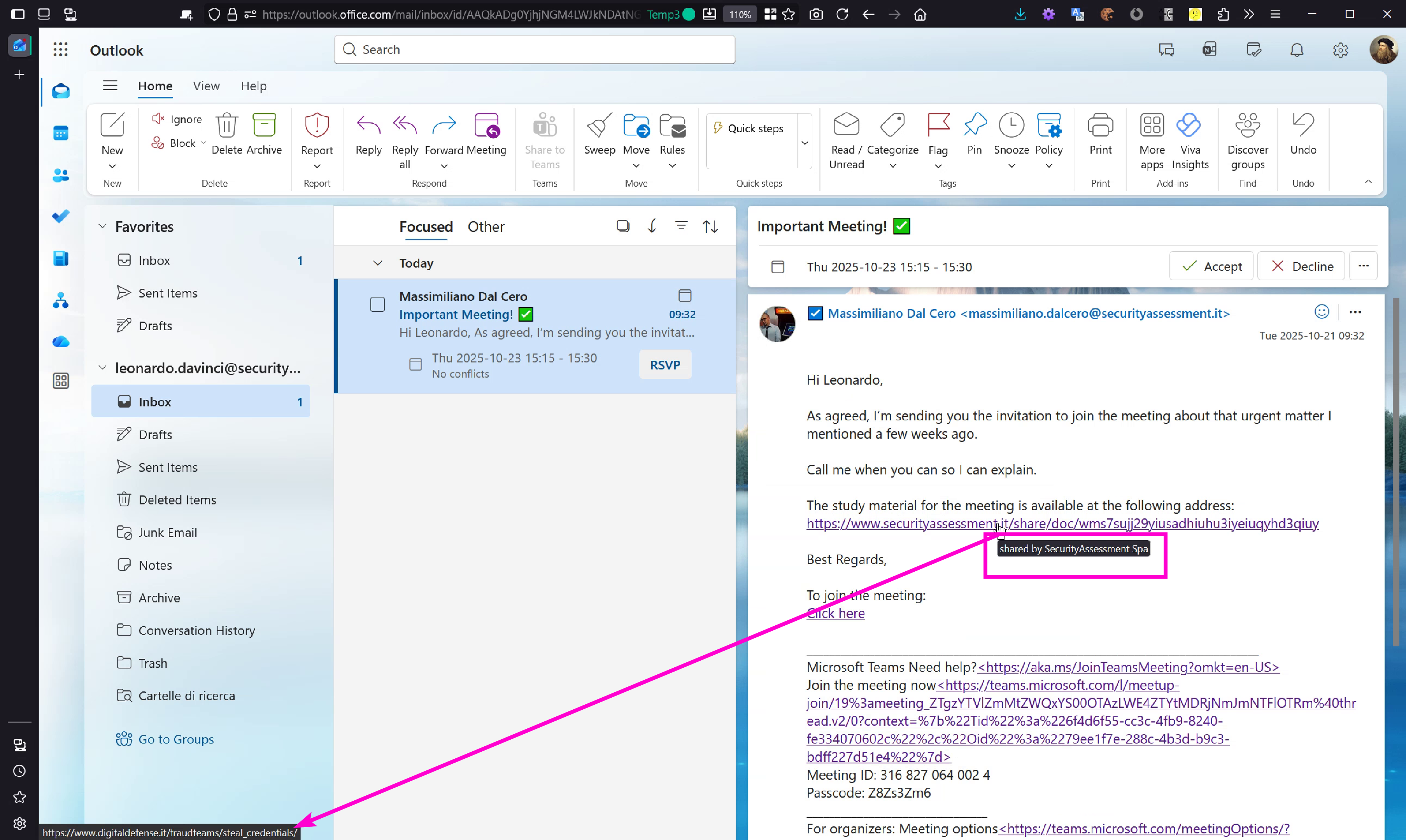
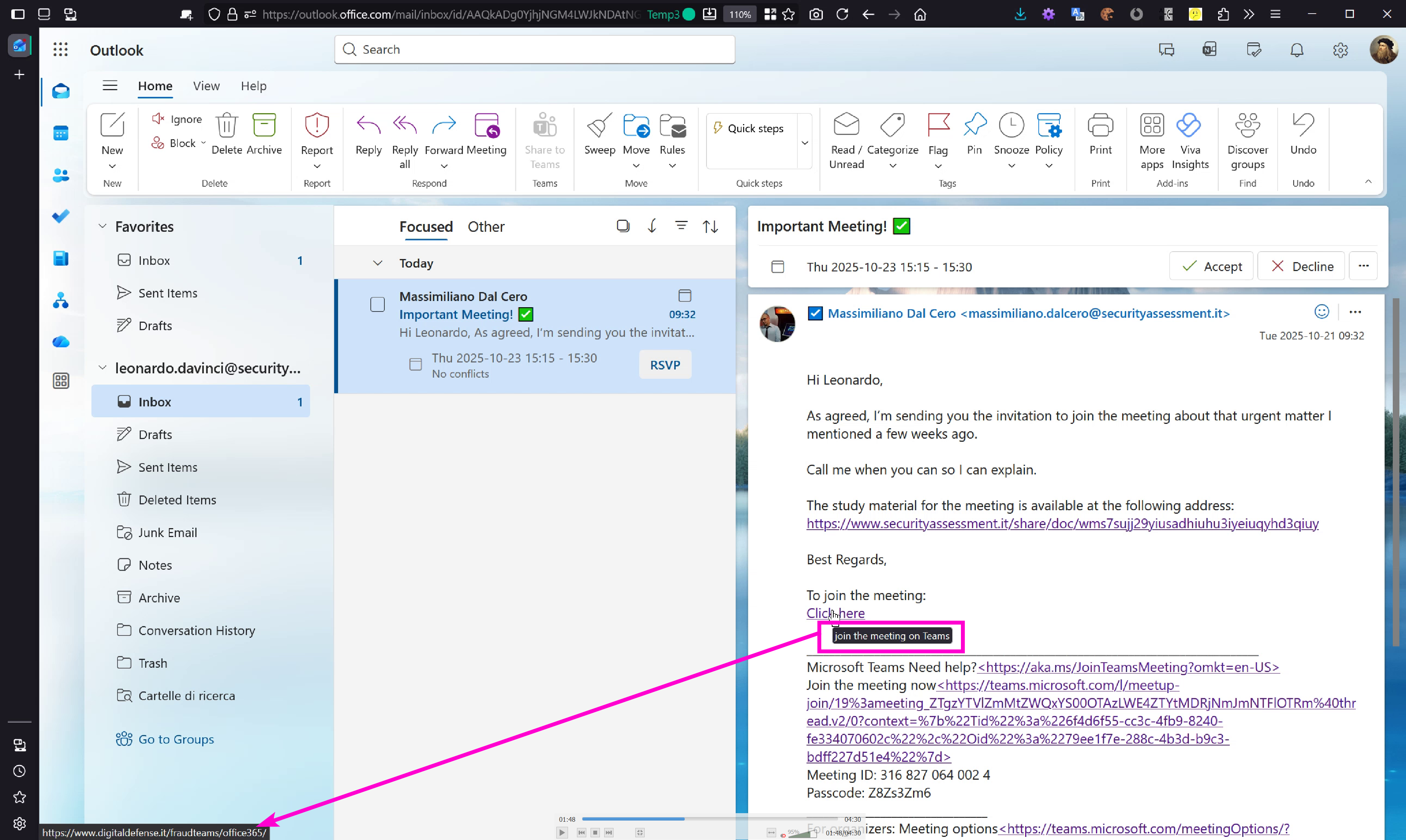
To detect that something is wrong one must hover over the textual part of the address; the detail pane then
reveals the full URL which in this test is obviously fake — an attacker however could register a more
convincing domain to better mask the deception. This demo purposefully highlights the mismatch for clarity:
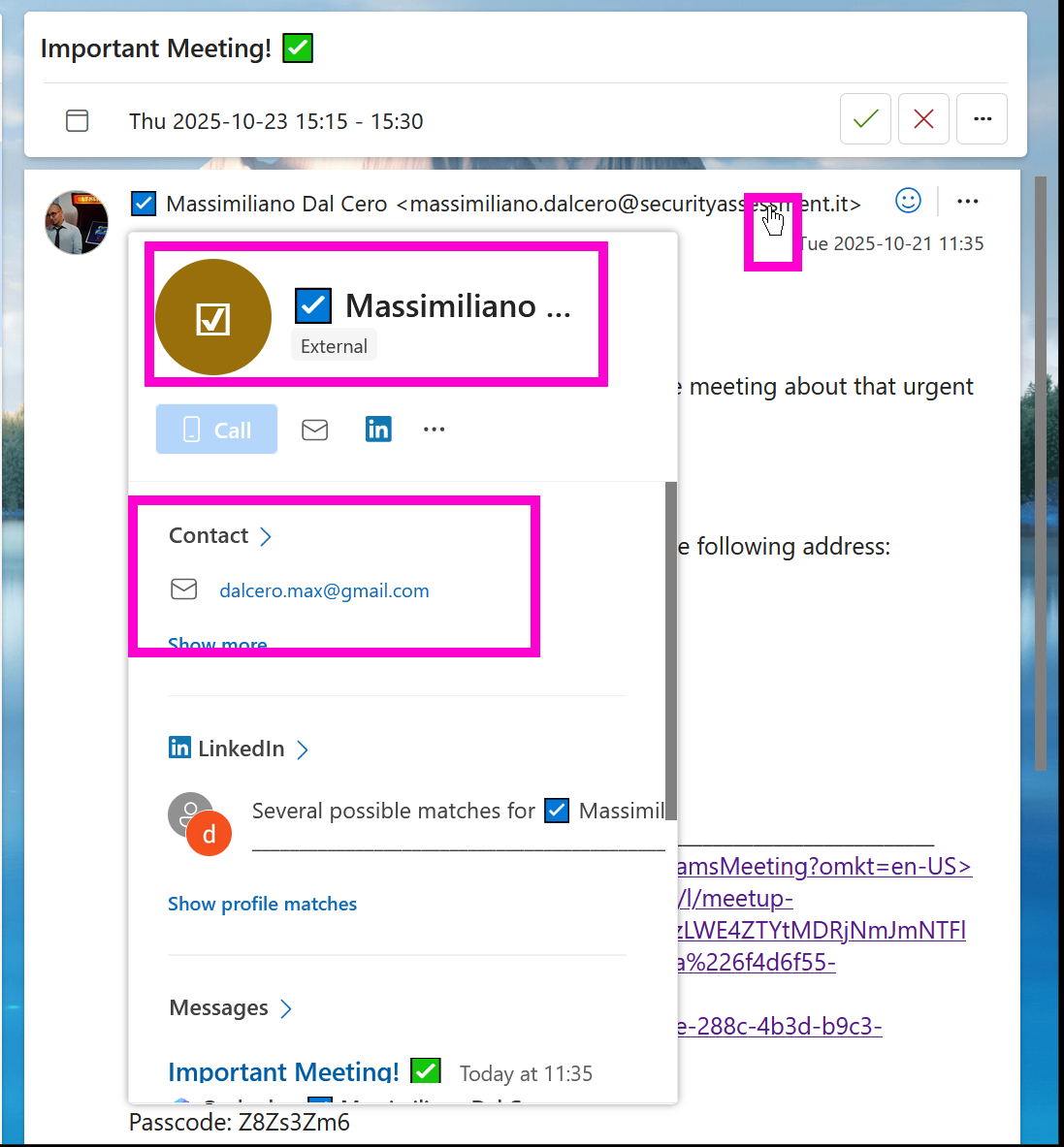
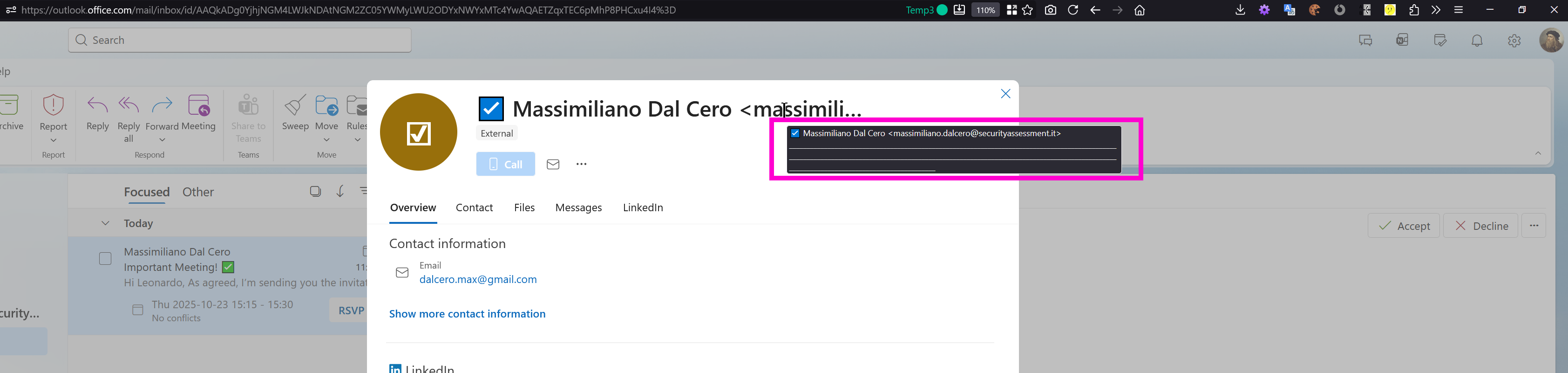
For a clearer view of the user name and the obfuscation strategy used, open the full detail pane: the attacker
inserted a large number of underscores "_" so that the inconvenient text is pushed outside the visible
interface. Notably, the main UI does not render those underscore characters in the primary screens:
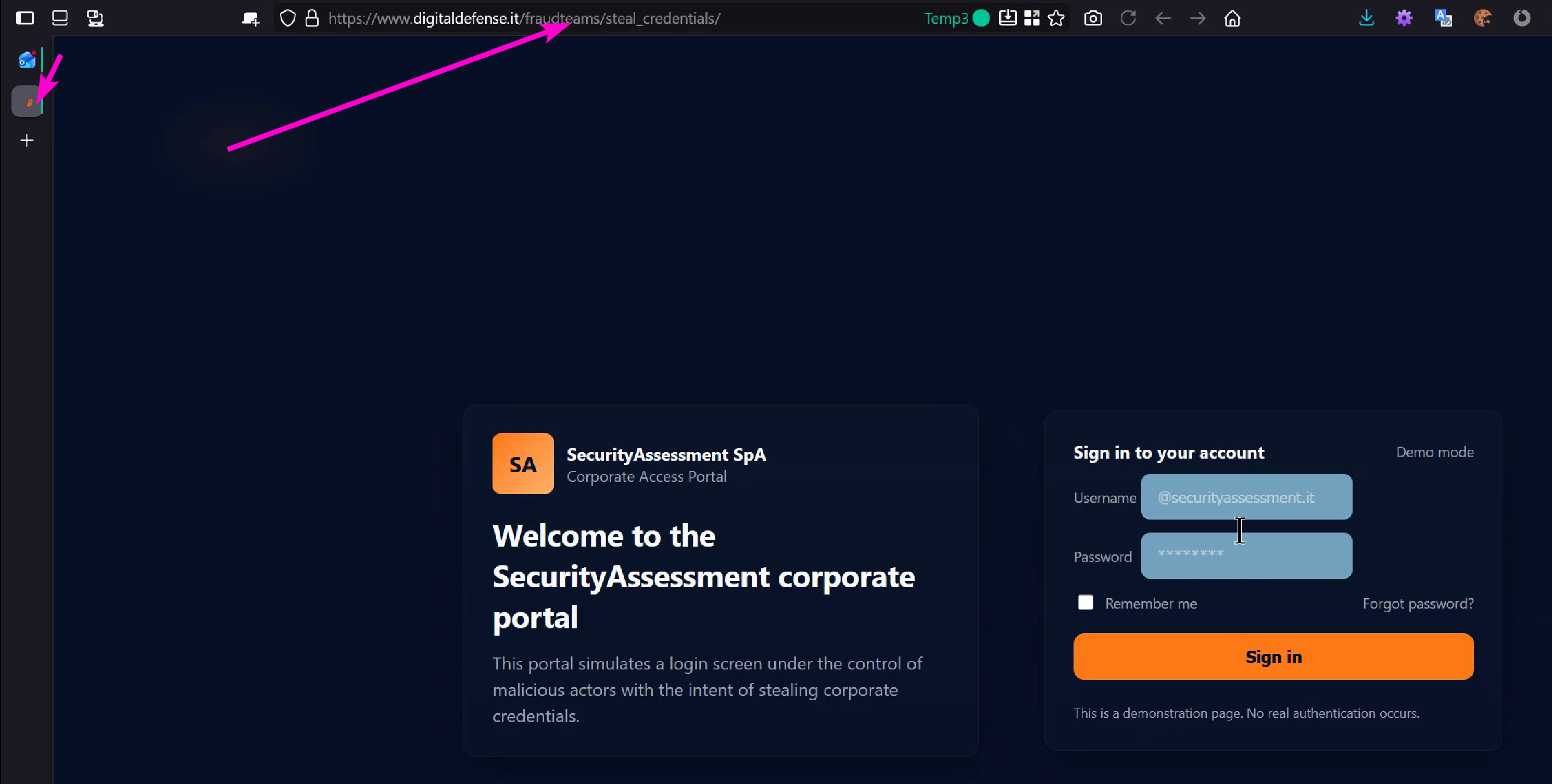
Clicking the link that points to the shared material redirects to a lure site. This element alone is not
unusual, but the altered link title increases the victim’s confidence and likelihood to click:
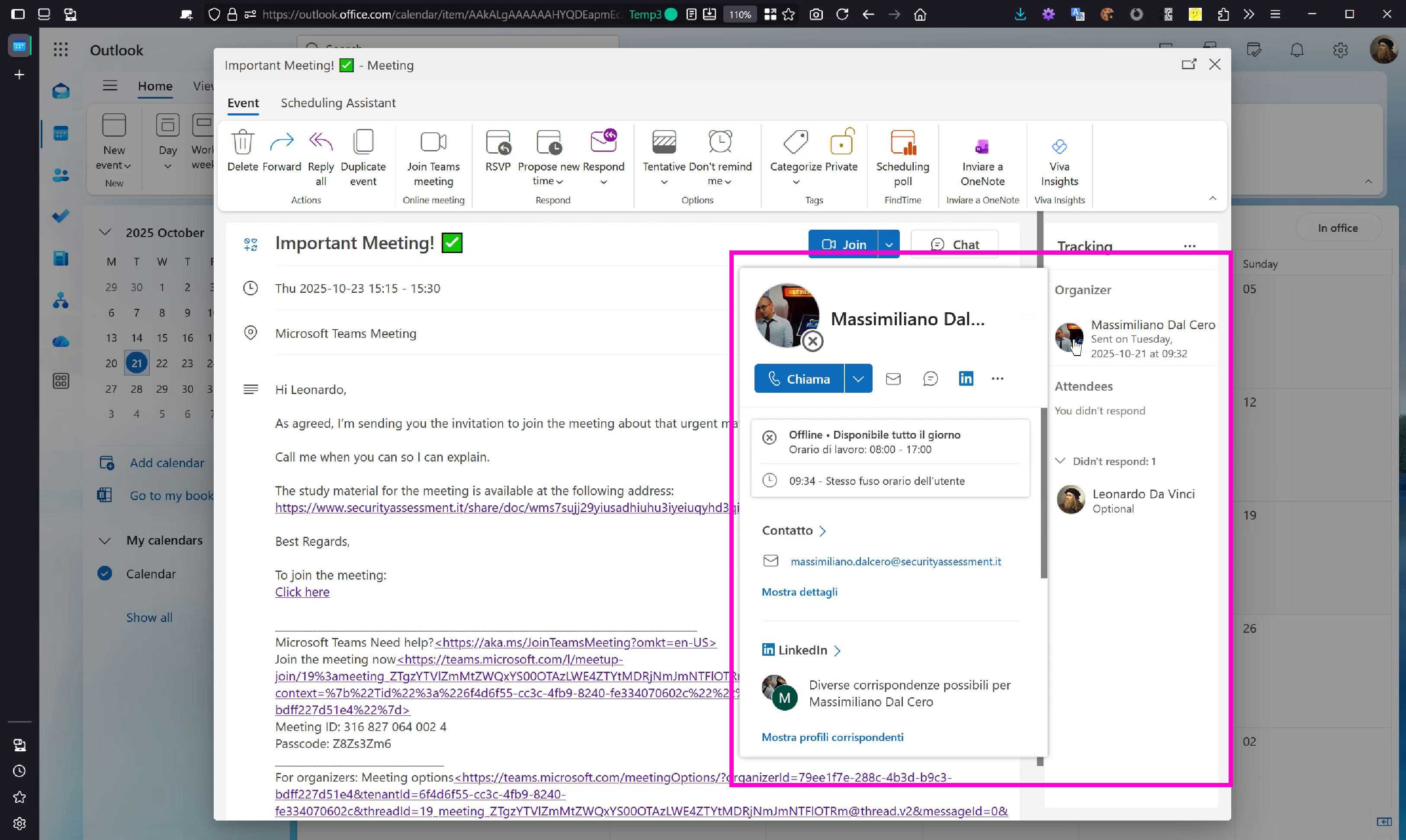
From the calendar interface, after opening the event detail, the organizer is shown as the internal user and
there is no trace of the original external sender. This makes the attack particularly dangerous because the
victim has no means to easily identify the malicious origin. Link titles are altered here as well, matching
what is shown in the mail interface:
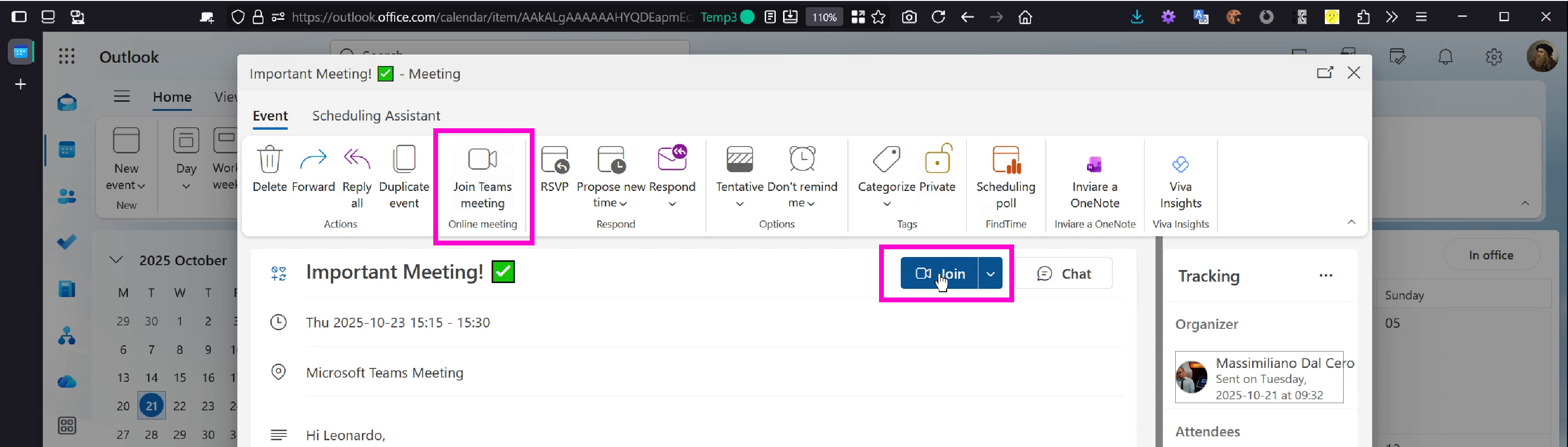
We now focus on the official interface buttons that users trust to join meetings — Outlook and Teams buttons
the user habitually clicks. By injecting a crafted iCal into the message it is possible to control the behavior
of these buttons and redirect the victim to fraudulent sites which may attempt credential harvesting or deliver malware.
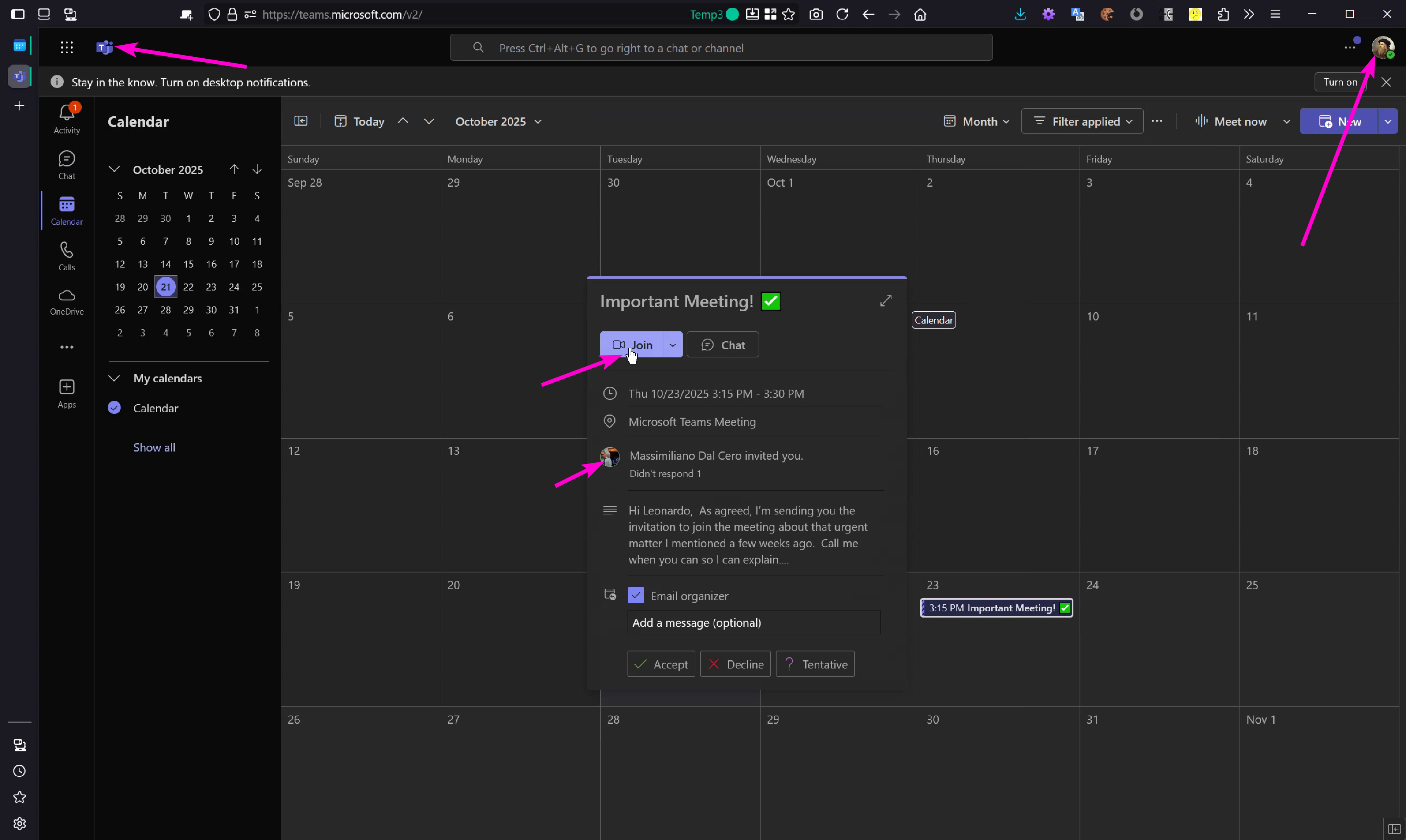
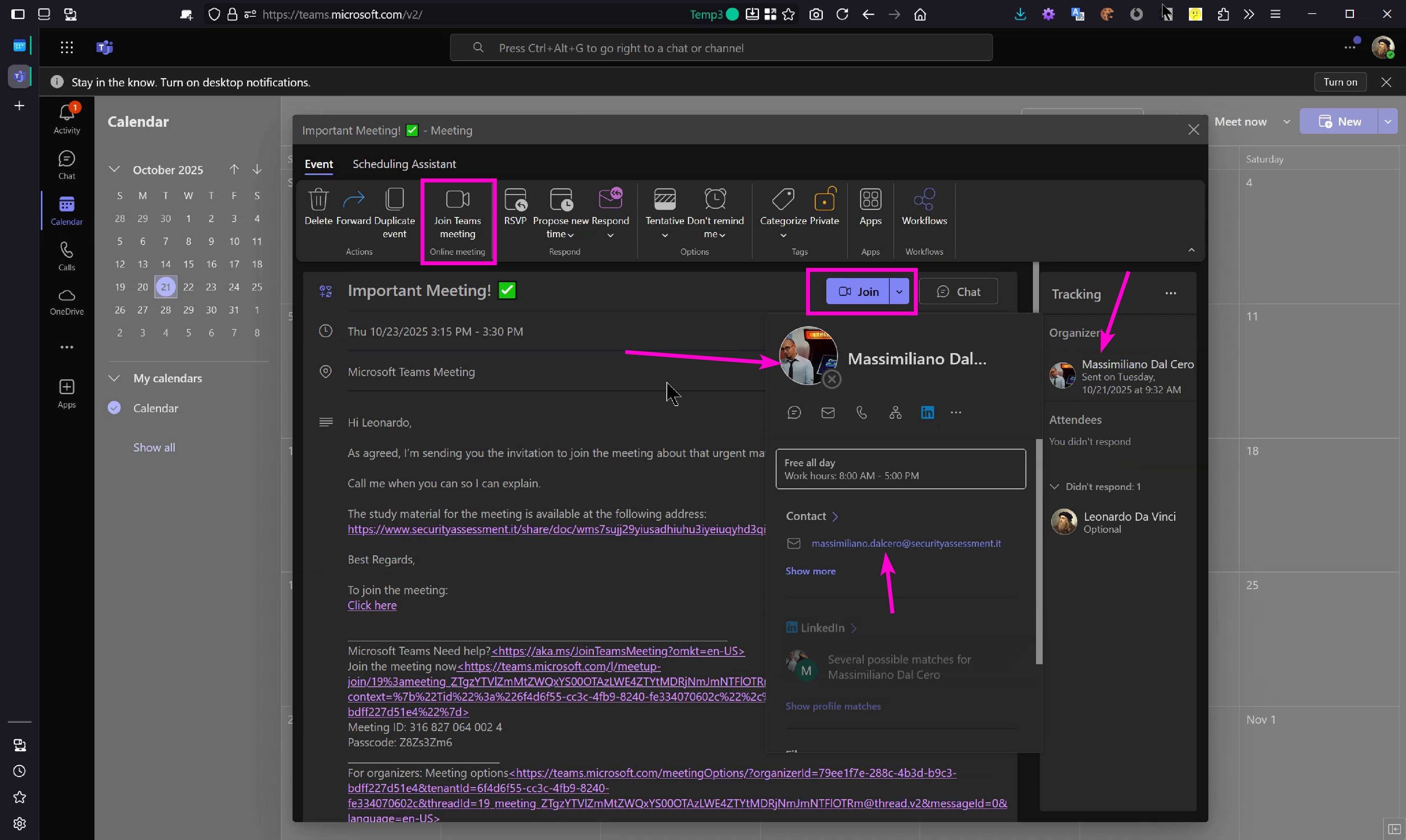
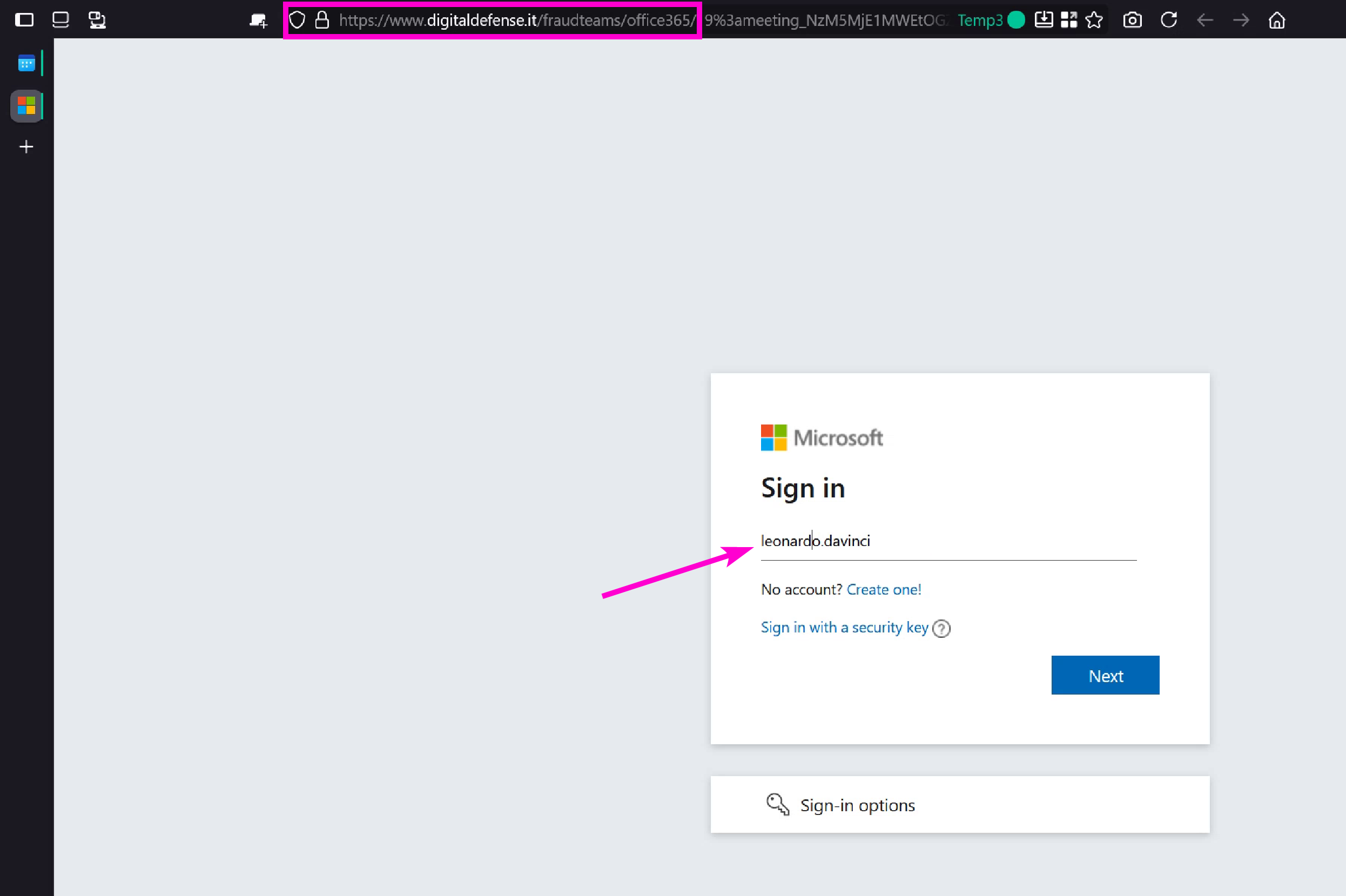
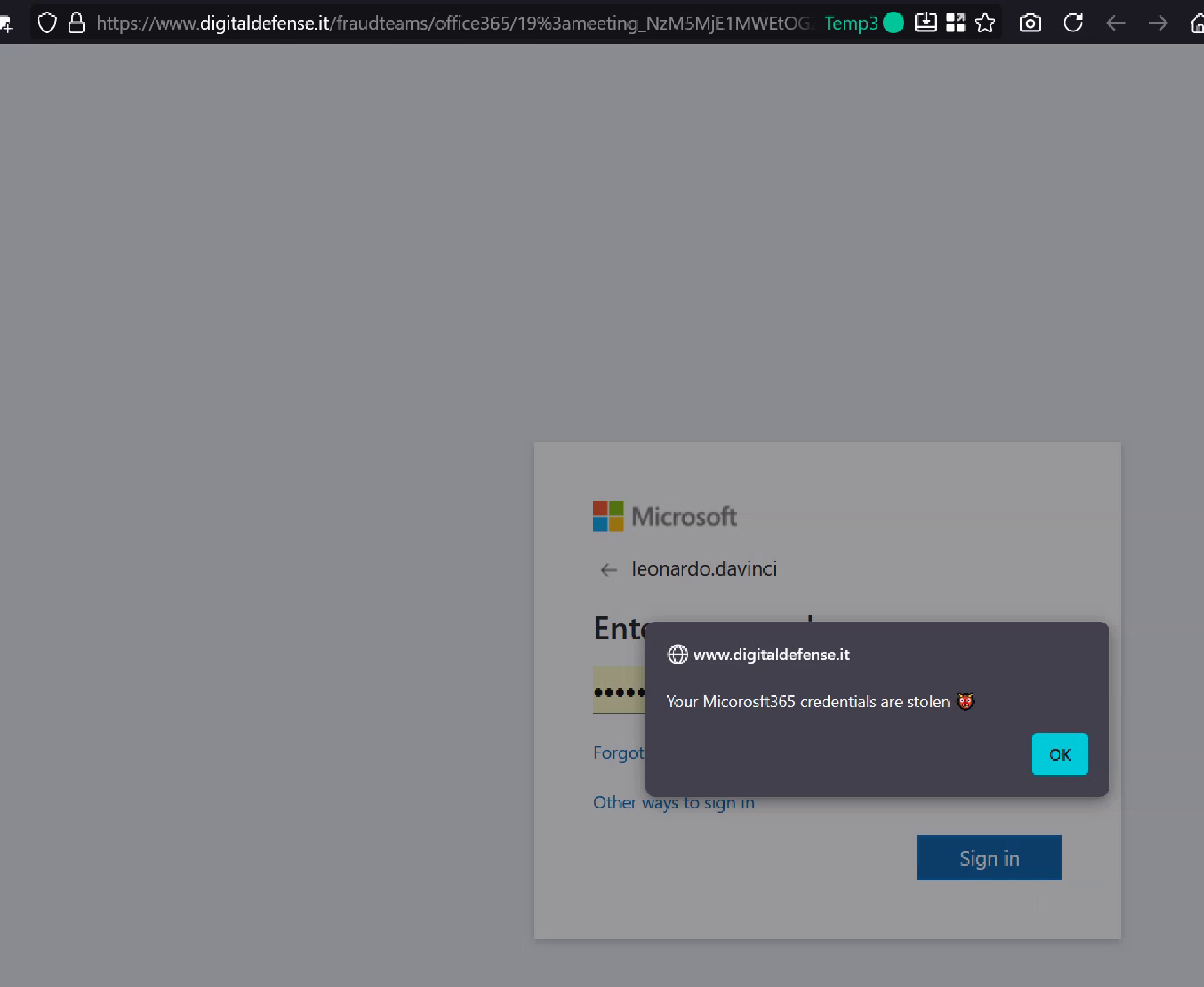
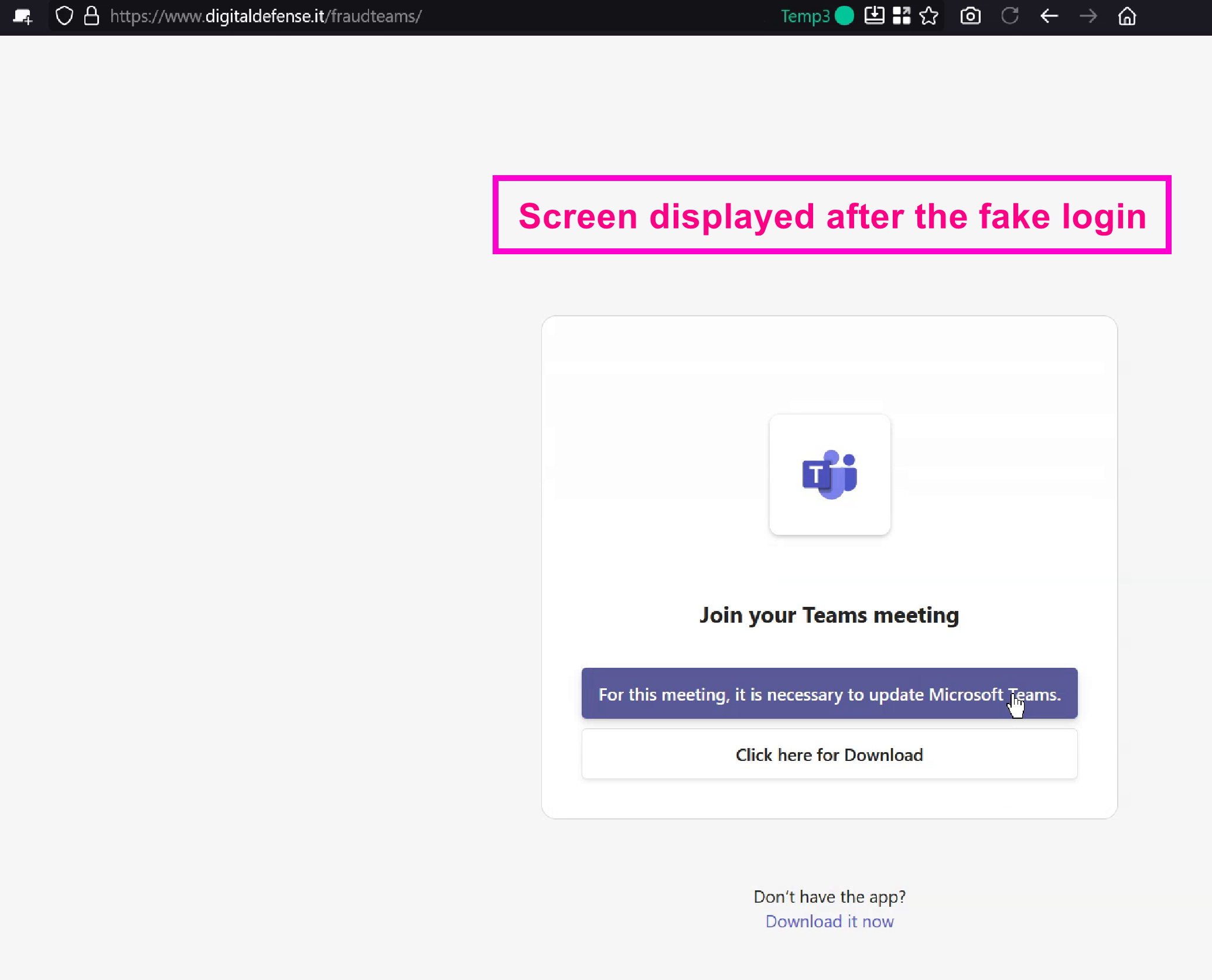
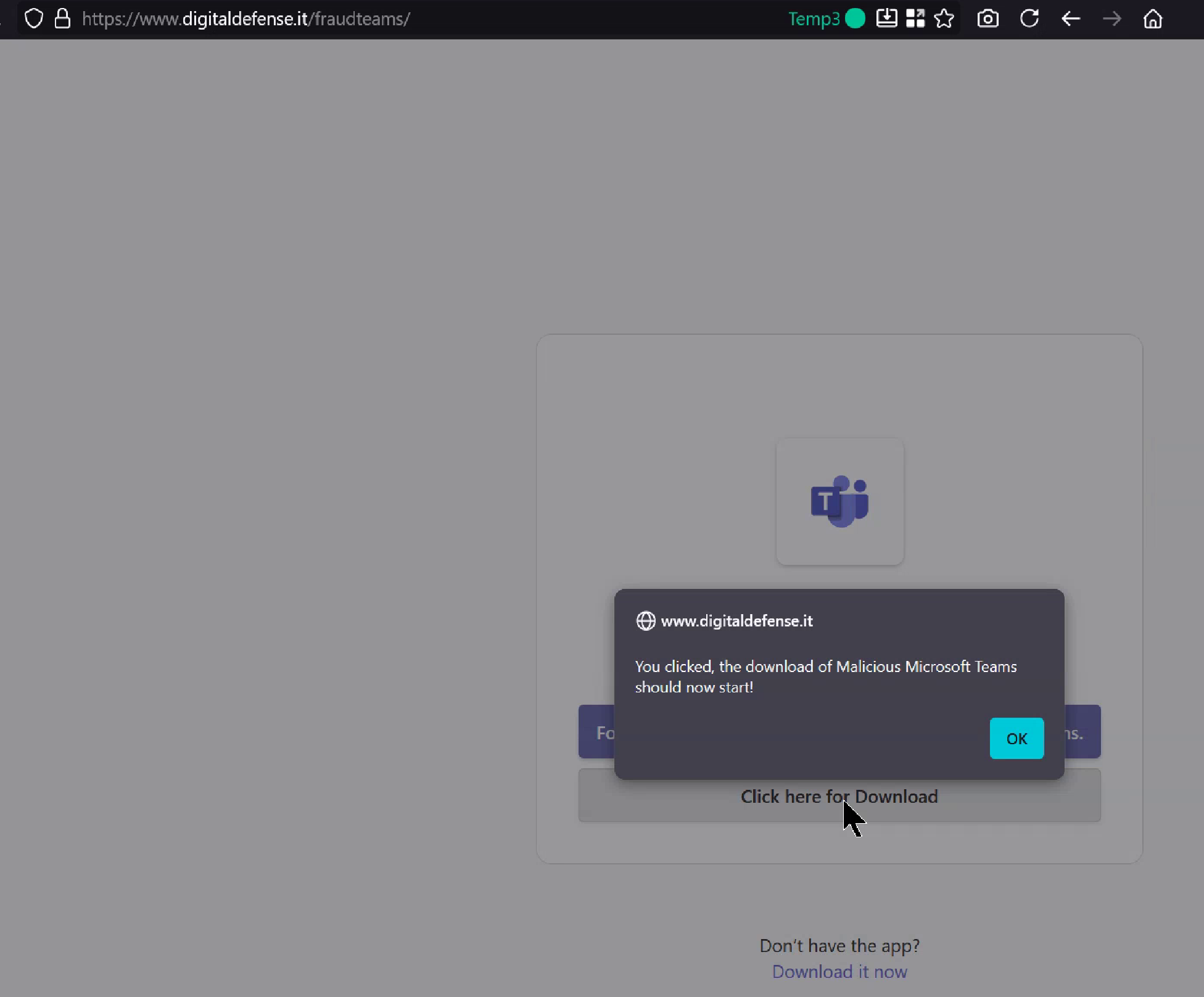
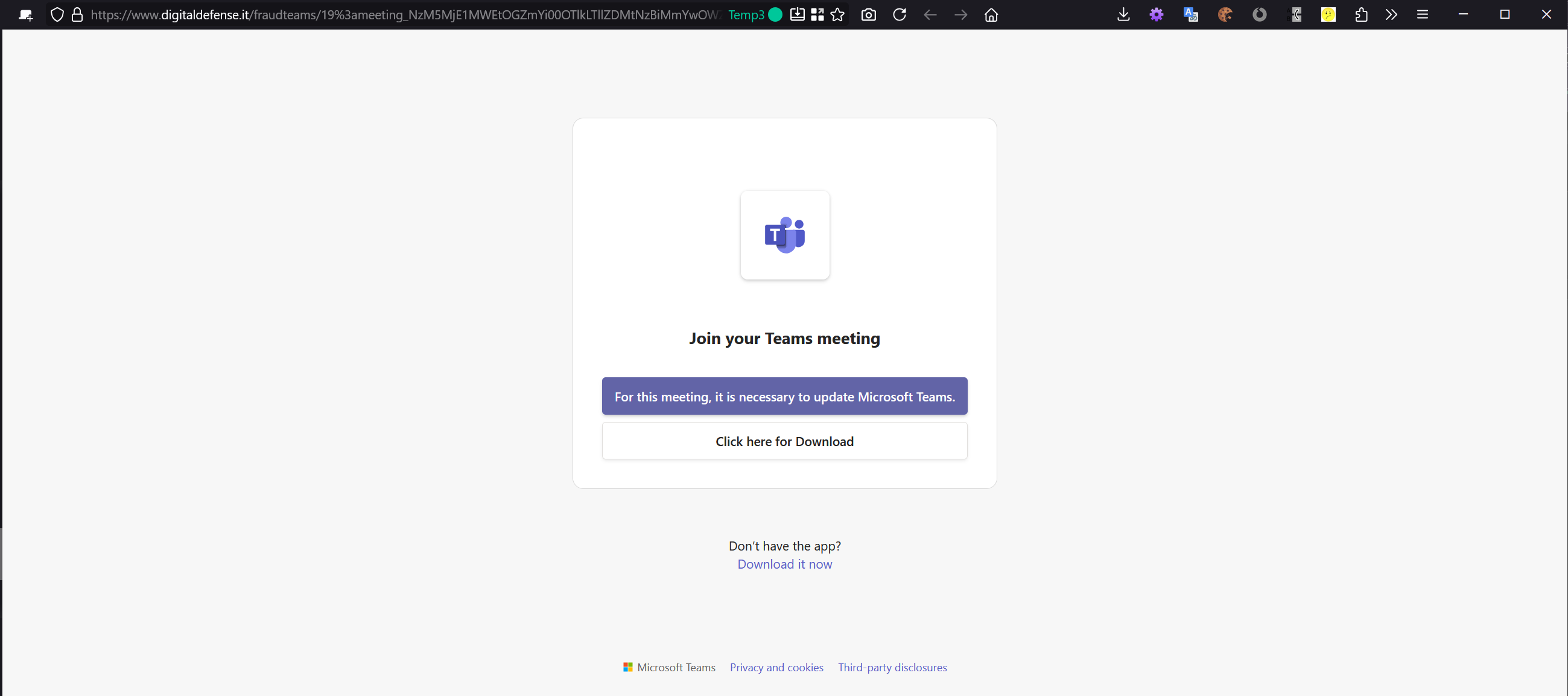
As shown, after clicking those interface buttons the user is redirected to a site external to Microsoft 365
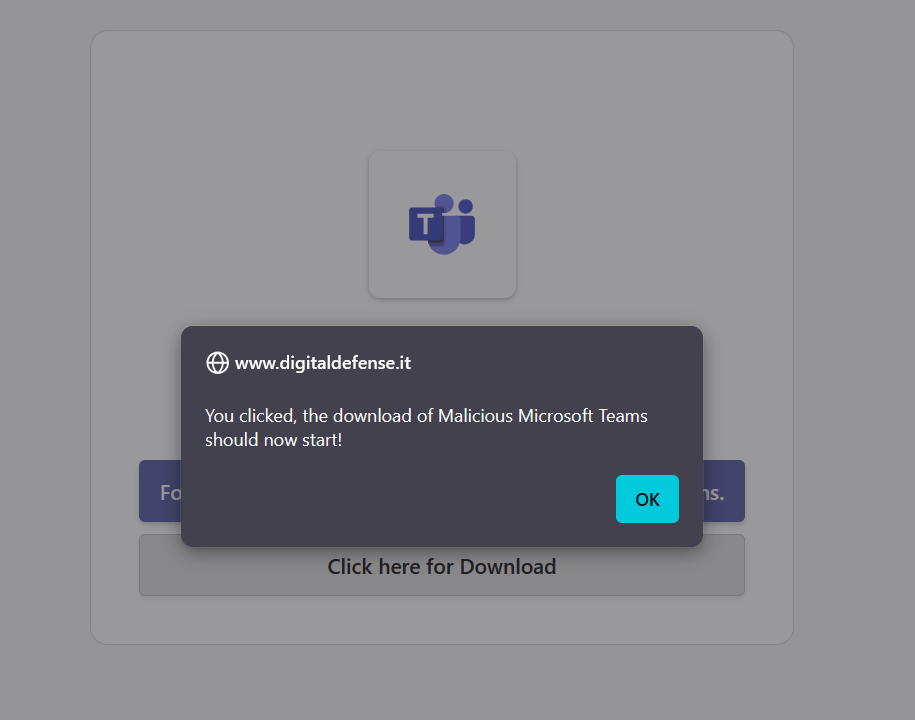
designed to steal credentials and eventually coax the user into installing malicious software:
Second scenario:
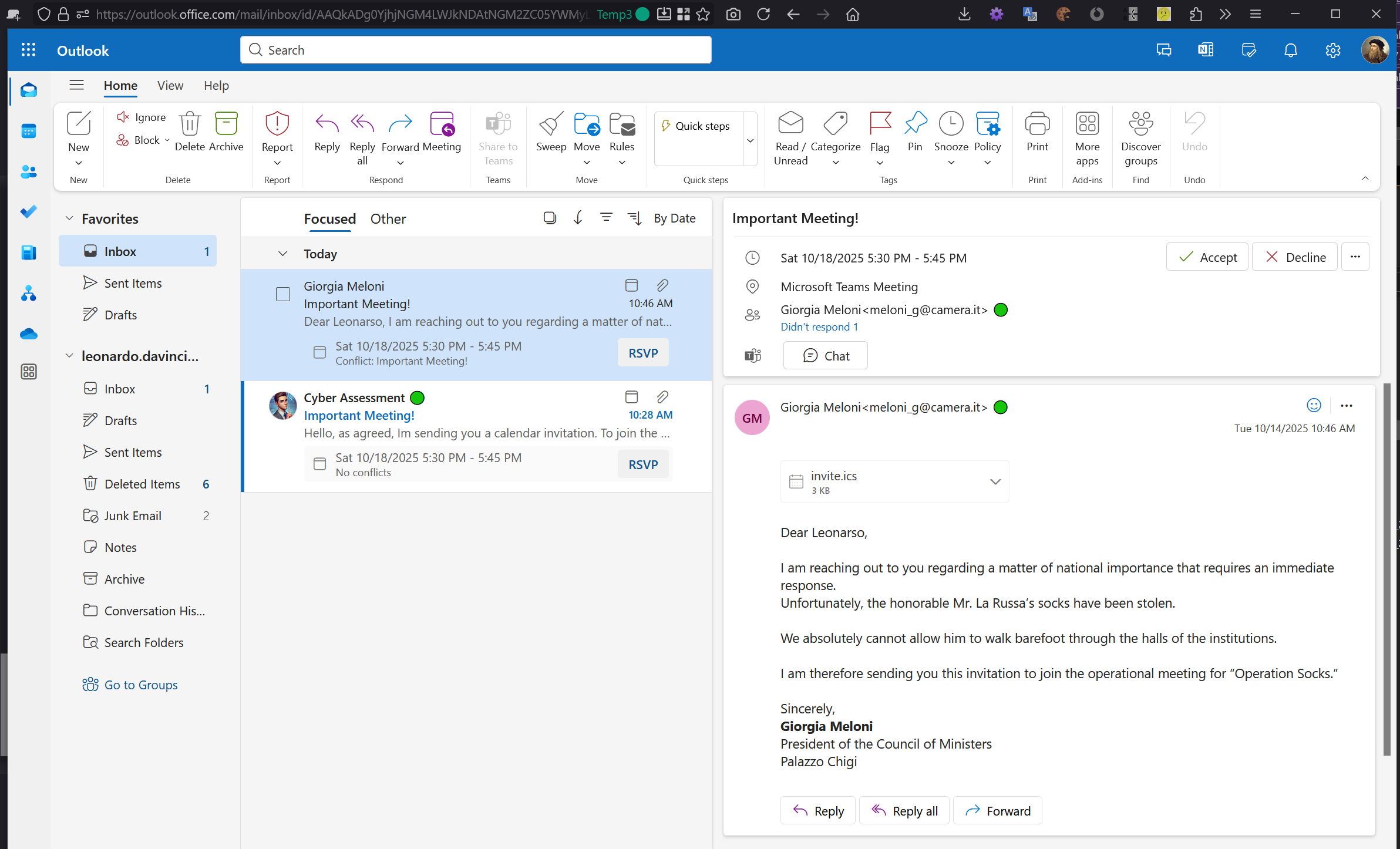
The second attack scenario involves sending the victim ([email protected]) an email invitation appearing to come from an institutional entity, such as the Italian Prime Minister “Giorgia Meloni”.
We will not display all the previous screenshots because the case is analogous; instead, we will show the screen illustrating its arrival:
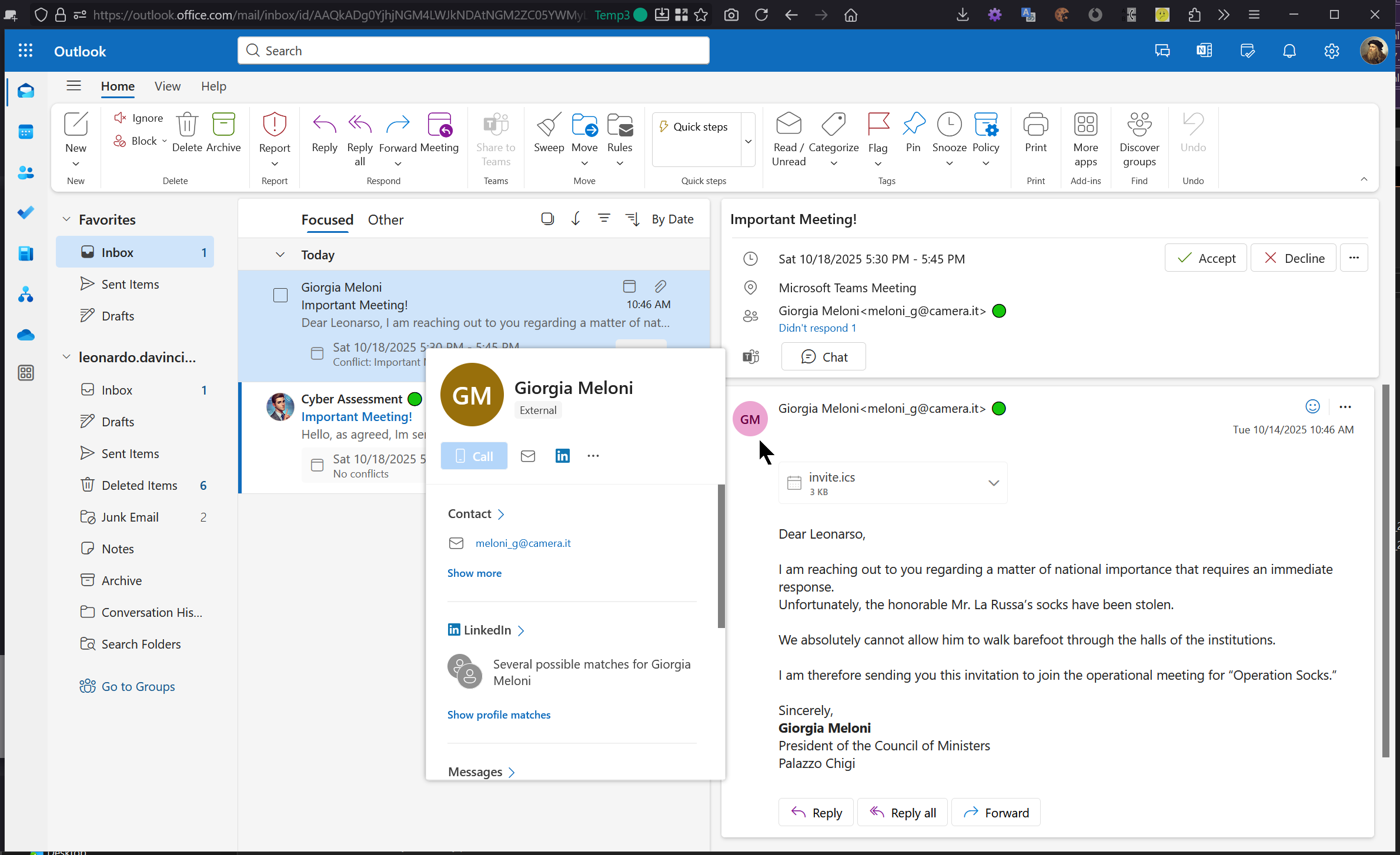

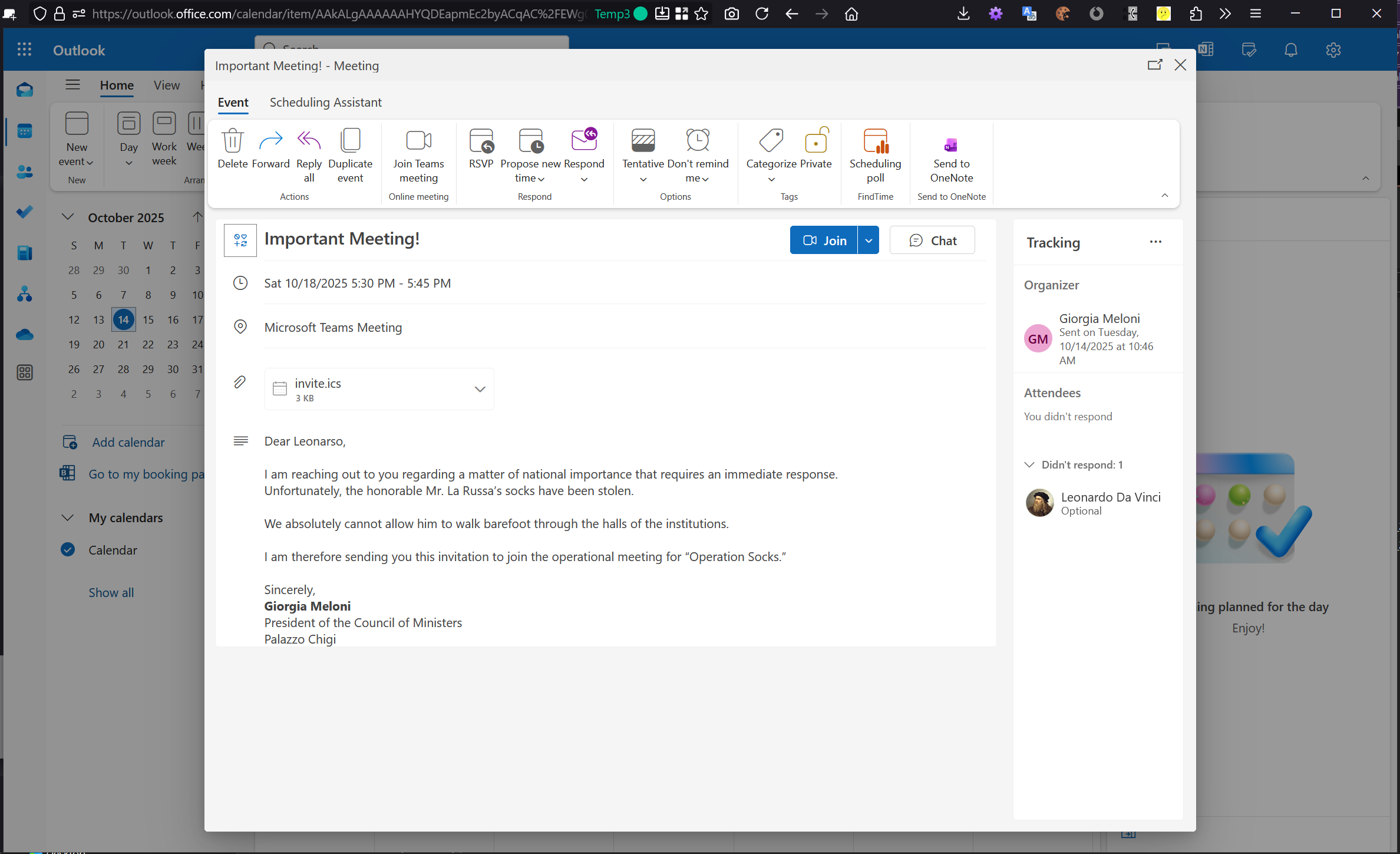
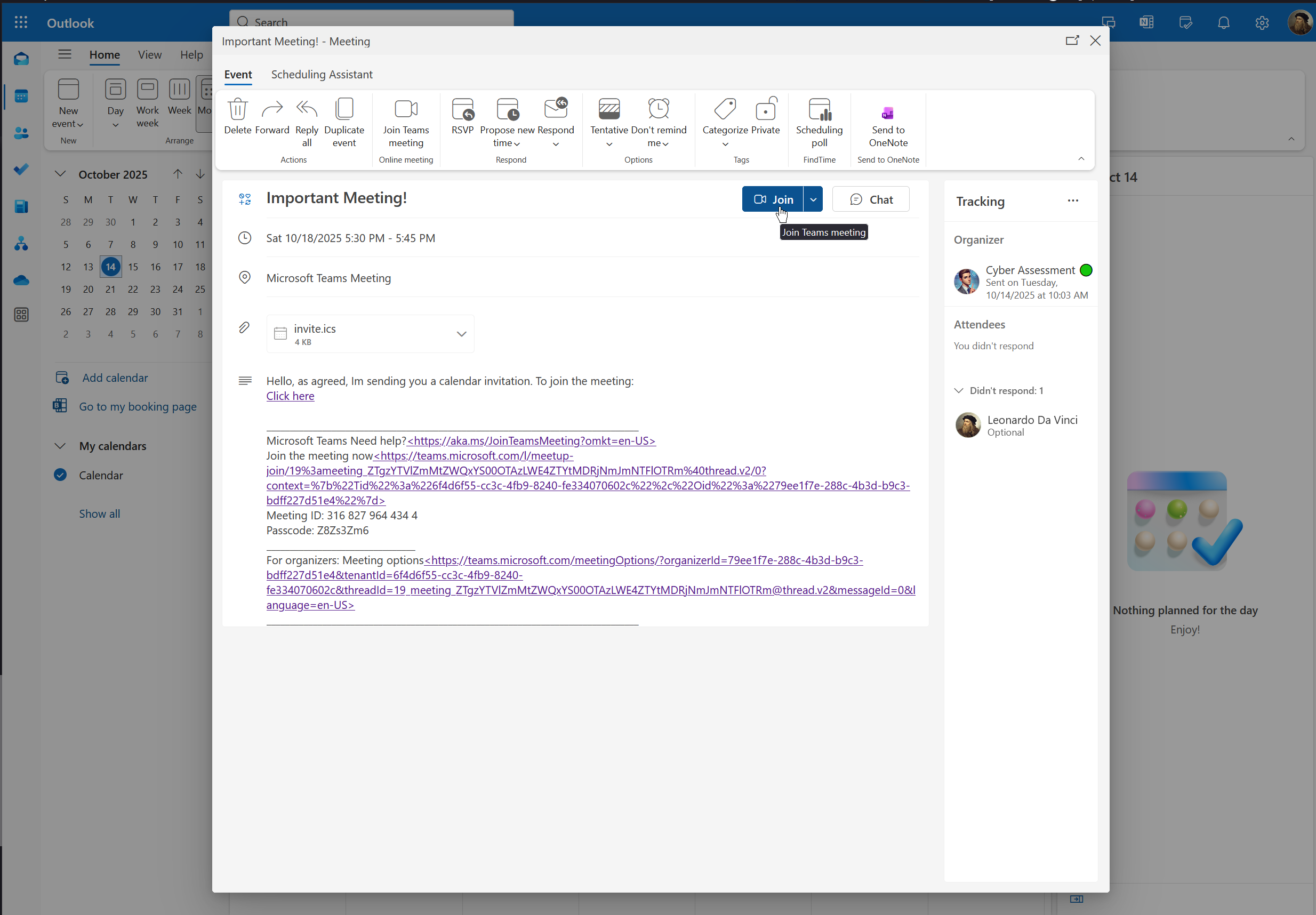
In this screenshot it is evident that there is no warning that the Outlook join link will point to a fraudulent site where an attacker could decide to have a malicious component downloaded or carry out a credential harvesting activity. In our example we simulated an infection.
A similar discussion can be made for Microsoft Teams as shown in the screenshots below where the join button is again manipulated by the attacker:
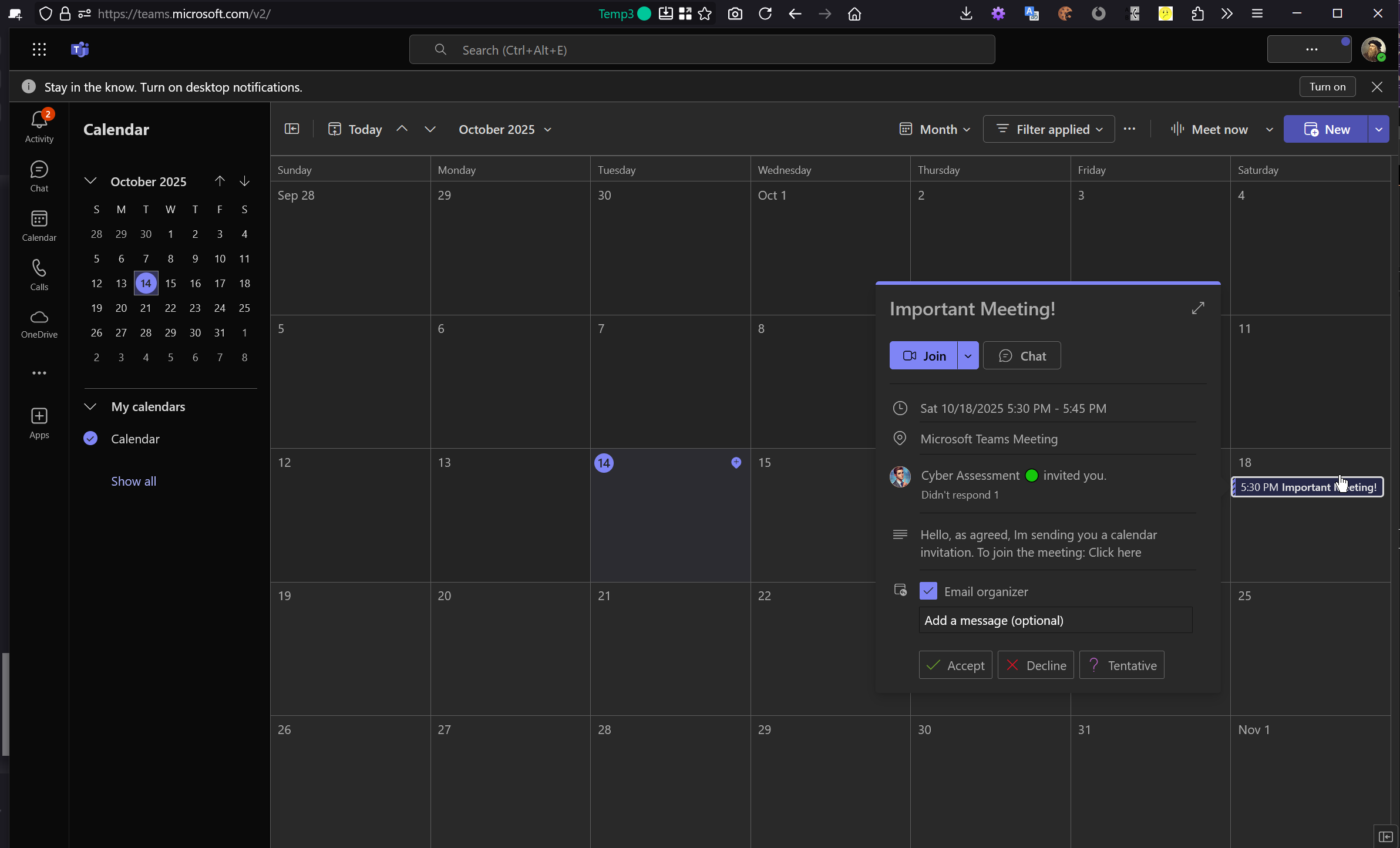
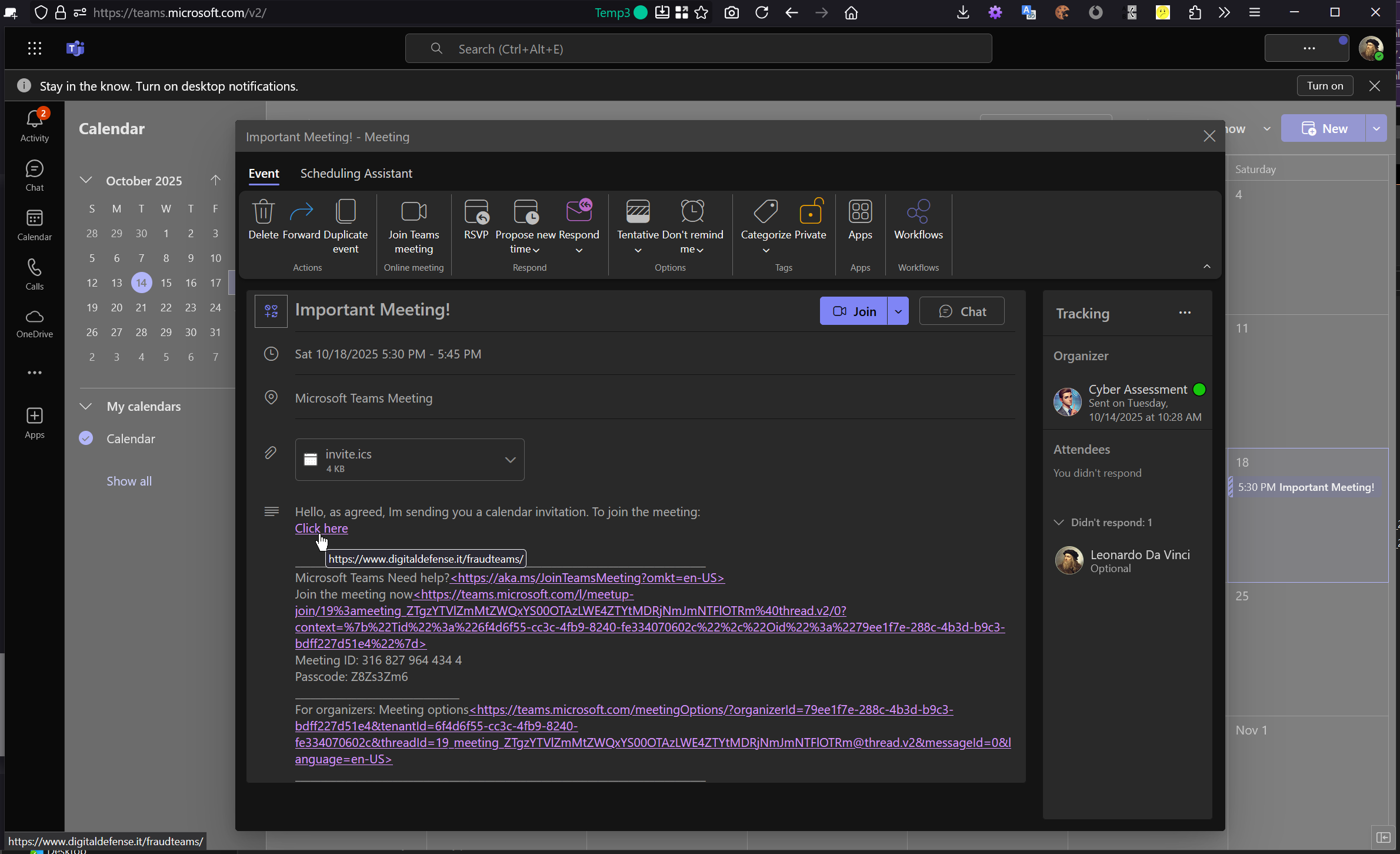
To better present the case, videos were also produced that show the whole process in action.
Demonstration videos
PoC — Python
This proof of concept (apoicalypse.py) automates the creation and delivery of a crafted iCalendar (ICS) invitation via SMTP. The invitation is designed to (a) surface the attacker-controlled
description as the visible event body in Outlook/Teams and (b) steer the Teams “Join” action toward a custom URL. The script is intended for controlled testing only.
How it works (high level)
-
Build the ICS with a title, time window, location (set to your custom
link), and a description that contains the HTML you want rendered in the event body (e.g., viaX-ALT-DESC;FMTTYPE=text/html/DESCRIPTION). -
Embed the ICS in an SMTP email and send it to one or more recipients (
recipients_addresses). The UI will show the forged display identity and the event will appear in the recipient’s calendar. - Teams “Join” behavior can be influenced by injecting the desired meeting URL inside the ICS (client-interpreted field). Users clicking “Join” may be redirected to the specified external URL.
What you must customize before running
-
Organizer identity — who appears as the sender of the invitation:
organizer = ["Display Name <[email protected]>", "CN=Display Name 🟢:mailto:[email protected]"] -
Recipients — one or more target addresses:
recipients_addresses = ["Alice <[email protected]>", "Bob <[email protected]>"] -
Subject and Title — visible mail subject and event title:
subject = "Important Meeting!" title = "Important Meeting!" -
Link — the URL surfaced to users and used as event
location:link = "https://www.example.com/your-meeting" -
Body text — the HTML that will be injected into the ICS description and rendered in UI:
Tip: keep links fully qualified (HTTPS) and ensure the HTML is valid.
bodytext = "...your HTML body...";
description = bodytext.replace("\n", "\\n") -
SMTP configuration — server, credentials, and visible From header:
Use a test mailbox and a test SMTP account; never run this against production tenants without authorization.
{ "smtp_server": "smtp.gmail.com", "smtp_port": 465, "sender": "[email protected]", "password": "********", "from_who": "Display Name", "from_mail": "[email protected]", "from_extra": "🟢" } -
Schedule — event date and time (UTC in the sample):
year = 2025; month = 10; day = 14;
hours = [18] # one or more start hours
Execution flow
-
For each
recipient_address, the script generates the ICS with your customized fields. - It prints the ICS content for verification and then sends the email with the ICS attached.
-
A short delay (
time.sleep(5)) separates messages in multi-recipient runs.
Test & safety notes
- Run only in controlled test environments, with explicit authorization.
- Use test tenants/mailboxes and non-production SMTP credentials.
- Verify that recipients clearly understand this is a security validation and not a production invite.
Conclusions
The issues described in this document clearly demonstrate that we are not dealing with complex exploits, but with the combined and legitimate use of standard Microsoft 365 features that leverage both technical stratagems and the trust users place in the platform.
It should be noted that the screenshots shown all refer to the web applications, but the same behaviour has been observed in the Teams desktop applications and in the latest version of Outlook.
The ability to manipulate headers, ICS invitations and Teams interface behaviours enables an attacker to construct highly credible campaigns that are difficult to detect and able to systematically circumvent current controls and defenses.
Two additional, critical observations further elevate the urgency of remediation:
- Calendar saturation as an attack amplifier. It is immediate and trivial for an attacker to flood a target’s calendar because every delivered invitation may automatically create an entry. Although this is expected behaviour from a functional perspective, there is no effective trust gate that verifies the bona fides of the sender before the event becomes visible. What might appear as a mere nuisance—many unsolicited events—becomes a powerful attack multiplier: by creating numerous calendar entries an attacker can deploy multiple simultaneous lures, increasing the chance that a victim will interact with at least one malicious item. The cumulative effect is a dramatically higher probability of successful social-engineering outcomes and a larger attack surface within the same victim account.
- Low barrier to credible impersonation. In our tests we used a Gmail account for delivery; however, a real attacker can easily register or acquire purpose-built domains and legitimate-looking sending infrastructure to add authoritative appearance to their messages. Using a dedicated domain and well-crafted sender infrastructure removes the few remaining visual cues that might otherwise arouse suspicion, further reducing detection rates and increasing user trust. In short, moving from “test” infrastructure to attacker-grade infrastructure is trivial and greatly increases the real-world potency of these techniques.
In the absence of adequate actions or a satisfactory mitigation plan, this document will be published in full, including technical details, screenshots and PoCs, to ensure maximum public awareness and to encourage an effective response. Our objective remains pragmatic and responsible: not to sensationalize the issues, but to ensure that a known, reproducible and exploitable problem is recognized, tracked and resolved before it can be used at scale.
The danger of these issues does not lie in technical sophistication, but in their plain effectiveness: they can be exploited with simple tools, amplifying the potential impact of any large-scale attacks.
To ensure transparency and technical reproducibility, a Python script will be attached that automates the entire described procedure, including the generation and controlled sending of the malicious invitation in a test environment.
The intent is not to demonstrate a single PoC, but to document a structural risk that requires prompt and concrete remediation.
dr. Massimiliano Dal Cero